This is the abridged developer documentation for BiomAPI
# From device to web‑ready biometry
> Extract measurements from a report. Check them against the original. Export the result or share it with a BiomPIN.
## Use BiomAPI [Open the web app](https://biomapi.com/) to process a PDF, image, or JSON file. Check the measurements. Correct errors and download the result. No account is needed for public access. * Export datasets as CSV, Excel, and individual JSON files. * Upload a photo from your phone or transcribe a printout. * Share a BiomPIN or open a result in the ESCRS calculator. Follow the [first-report walkthrough](/docs/guides/getting-started/#use-biomapi), or explore the [CLI](/docs/guides/cli/), [AI assistant guide](/docs/guides/ai-skill/), and [BiomFILL browser extension](/docs/guides/web-app/#use-biomfill). ## Integrate BiomAPI For browser form filling, start with the [Web Widget](/docs/api/web-widget/). It provides an interface to upload and check reports. It returns the result when the user presses **Send**. The [Browser SDK](/docs/api/browser-sdk/) opens the widget and provides BiomPIN retrieval, sharing, and optional browser history. Use the [REST API](/docs/api/endpoints/) for direct file processing, your own interface, or server-side automation. **Using a coding agent?** Point it to [`llms.txt`](https://biomapi.com/llms.txt). [Build with an AI agent](/docs/guides/ai-docs/) explains how to use the OpenAPI schema and full documentation together. ## Understand your results BiomAI extracts PDF and image reports. BiomJSON validates JSON, while BiomDIRECT identifies directly entered or edited data. BiomPIN provides temporary, encrypted sharing. See [how processing works](/docs/guides/how-it-works/), [supported devices and extraction limits](/docs/guides/supported-devices/), and [how your data is handled](/docs/privacy/).
# Getting started
> Process your first report or add reviewed biometry to your application.
BiomAPI turns biometry reports into structured measurements. Use the web app to check a report. Use the widget to add this interface to your application. ## Use BiomAPI 1. [Open BiomAPI](https://biomapi.com/). Choose **Open file** and select a supported PDF or image. For a test, save the [synthetic JSON report](/docs/examples/report.json) as `report.json` and open it. 2. Select **Process Biometry**. BiomAI extracts PDFs and images. BiomJSON checks JSON without an AI call. 3. Check the patient, examination date, and OD/OS measurements. With a PDF or image, use **Original** to reopen the source, or **Compare** on a wide screen. Select **Edit** to correct values. 4. Choose **Download** to keep the JSON result. If a BiomPIN was created, you can copy its link or open the result in the ESCRS calculator. The web app requests a temporary BiomPIN automatically for single reports. Download results you want to keep. Browser History lists temporary shares. It does not keep a permanent copy of the measurements. Continue with the [Web app guide](/docs/guides/web-app/) for phone upload, manual entry, datasets, and sharing. Before uploading patient data, review [how BiomAPI handles it](/docs/privacy/). ## Integrate BiomAPI Start with the [Web Widget](/docs/api/web-widget/) to add BiomAPI’s upload and review interface to your application. The [Browser SDK](/docs/api/browser-sdk/) opens the widget and provides BiomPIN retrieval, sharing, and optional local history. Use the [REST API](/docs/api/endpoints/) for direct file processing, your own interface, or server-side integrations. ### Use the Web Widget The [Web Widget](/docs/api/web-widget/#quick-start) opens BiomAPI from a button in your application. The user uploads or retrieves a report. They check the result and press **Send**. Your application receives the checked response. Cancellation returns no data. [Try the live demo](/browser-sdk-demo), then copy the complete example in the widget guide. ### Make a REST request Try the API with synthetic data. These commands save a sample report, submit it, and save the response:
```bash
curl --fail-with-body -o report.json https://biomapi.com/docs/examples/report.json
curl --fail-with-body https://biomapi.com/api/v1/biom/process \
-F "file=@report.json" \
-o result.json
```
Open `result.json`. Measurements are under `data`; `metadata.extraction.method` is `BiomDIRECT` for this JSON input. No BiomPIN is created unless you add `-F "biompin=true"`. To extract a PDF instead, change the file argument to `file=@report.pdf`. To create your own JSON, follow [JSON input / BiomDIRECT](/docs/api/json-input/) for the required objects and automatically added metadata. Public requests need no API key. See the [REST API](/docs/api/endpoints/) for options and errors, the [response schema](/docs/api/response-schema/) for fields, and [authentication](/docs/api/authentication/) for higher quotas or your own OpenRouter key. ## Work from a terminal or assistant Use the [CLI](/docs/guides/cli/) for terminal workflows, or follow [Use with an AI assistant](/docs/guides/ai-skill/) to process reports through a supported assistant. For help building an integration, see [Build with an AI agent](/docs/guides/ai-docs/). If something goes wrong, see [Troubleshooting](/docs/guides/troubleshooting/).
# How it works
> How reports become structured data, how edits affect provenance, and how results are shared.
BiomAPI selects a processing path for your file. It checks the result and returns measurements for you to review. Processing and BiomPIN retrieval return the same [response structure](/docs/api/response-schema/). ## From file to result | Input | Processing | Result | | ------------------------------ | ------------------------------------- | ---------------------------------------------------------------- | | PDF, JPG/JPEG, PNG, GIF, BMP | BiomAI reads the report with Gemini | Core biometry measurements and extraction provenance | | JSON | BiomJSON validates the provided data | A standard response with the original or direct-entry provenance | | Manual entry or a web-app edit | The app submits JSON through BiomJSON | Validated data attributed to BiomDIRECT | File routing uses the extension. PDF and image uploads also receive basic content checks. Unsupported formats or mismatched content are rejected before extraction. ## The three processing paths ### BiomAI — LLM Extraction Technology preview Check every value against the original report. BiomAI has been tested and optimized for: Alcon Argos, Haag-Streit Eyestar 900, Haag-Streit Lenstar 900, Heidelberg Anterion, OCULUS Pentacam AXL, Tomey OA-2000, Topcon Aladdin, ZEISS IOLMaster 700. BiomAPI prepares the uploaded report for Gemini, requests structured measurements, and validates the returned data. Preparation can change the file format or image sent to the model to improve processing. The web app keeps your original available for comparison during that session. BiomAI extracts the core report fields and, for IOLMaster700, explicitly printed posterior and total keratometry into `extra_data`. Free-text notes are provided through manual entry or JSON. See [supported devices and extraction limits](/docs/guides/supported-devices/). The service sends reports through OpenRouter with server-default, assigned or BYOK credentials. [BYOK](/docs/api/authentication/#use-your-own-openrouter-key) overrides managed credentials. Requests never switch keys on retry. Each extraction reserves one credit. Temporary provider failures can trigger a retry within the workflow deadline. Server-default requests share a limited waiting queue and a provider start budget. See [credits and limits](/docs/api/rate-limits/). ### BiomJSON — validation and round-trips BiomJSON accepts a report inside a top-level `data` object or a saved BiomAPI response. It checks the structure, allowed values, and declared schema version without calling Gemini. Numeric values must use the units defined in the schema. You can extract a PDF, download its JSON, and re-upload that JSON later. Existing BiomAI provenance is kept when declared in the uploaded metadata. BiomJSON does not compare the JSON with the original report or detect whether someone edited a downloaded file. If you edit extracted values outside the web app, set the result’s provenance to `BiomDIRECT`. The web app makes that change automatically when you save an edit. ### BiomDIRECT — direct data entry BiomDIRECT describes the origin of data; BiomJSON performs its validation. Manual transcription, web-app edits, and JSON without BiomAI provenance receive this label. Integrations can also declare their source application and version. Start with [JSON input / BiomDIRECT](/docs/api/json-input/) for required objects, examples, and the metadata BiomAPI adds. The [response schema](/docs/api/response-schema/) describes the completed output. ## Read the result | Field | Contents | | ------------ | -------------------------------------------------------------------------- | | `data` | Device, examination date, patient context, and right/left eye measurements | | `extra_data` | Optional notes, posterior keratometry, or total keratometry | | `metadata` | Request ID, schema/app versions, and extraction provenance | | `biompin` | Sharing code and expiry, or `null` if no share was created | A missing measurement is `null`. It does not mean zero, normal, or confirmed absent. Validation checks whether a value fits the schema. It cannot confirm that the value was read from the correct eye or is clinically correct. ## Share with a BiomPIN A BiomPIN points to an encrypted, temporary copy of a result. It expires after 31 days by default. Patient initials and ID are removed before storage; other report fields remain. The web app can include initials and ID separately in a shared link, or exclude them when you select **Anonymous**. That choice does not anonymize all the remaining clinical data. See [BiomPIN sharing and identity](/docs/api/biompin/) before sharing a result. For processing destinations, storage, and retention details, read the [Privacy policy](/docs/privacy/).
# Web Widget
> Add a button that opens BiomAPI and receives reviewed biometry after the user presses Send.
The Web Widget adds BiomAPI’s upload and review interface to your browser application. It opens a popup where the user can process or retrieve a report, compare it with the original, and edit values. Your application receives the reviewed result after **Send**. Open the widget through the [Browser SDK](/docs/api/browser-sdk/). The complete example below includes its setup. [Try the live demo](/browser-sdk-demo). Choose the [REST API](/docs/api/endpoints/) when you want to build the review interface yourself or process reports on a server. ## Quick start Save this as an HTML page and serve it from your application’s HTTPS origin. Open the widget directly from a click so the browser can allow the popup. For a trial, upload the [synthetic JSON report](/docs/examples/report.json) inside the widget.
```html
Import biometry
```
This example displays the received measurements; replace that display with your form-filling code. For a working example with sharing and retrieval, see the [official demo](/browser-sdk-demo). Treat the response as patient data and avoid logging it in production. The example loads the hosted [Browser SDK](/docs/api/browser-sdk/), which follows the current BiomAPI deployment. Its interface is in active development; review the reference when updating your integration. ## Identify your application Use a stable `integrator.id` of up to 64 characters, starting with a lowercase letter or digit. The remaining characters may also include `.`, `_`, or `-`. Set `integrator.name` to the name users should see in the widget’s green handoff bar, up to 80 characters. The widget displays the name. BiomAPI uses these values to identify the integration in operational data. They do not authenticate callers. The `biomapi.*` namespace is reserved by convention for official clients. ## Handle the result `BiomAPI.widget.open()` returns a promise: | Outcome | Result | | ------------------------------------------- | ------------------------------------------------------------ | | User presses **Send** | Reviewed [`StandardAPIResponse`](/docs/api/response-schema/) | | User presses **Cancel** or closes the popup | `null` | | Popup or connection fails | Rejected promise with a widget error | The result card’s **Close** action clears the current result. It does not cancel the whole widget. Only one widget session can be active per page. Calling `open()` again focuses the existing popup and returns the same promise. Invalid integrator options throw immediately. Popup and connection failures reject the promise. A surrounding `try`/`catch`, as above, handles both. `BiomAPI.widget.BiomAPIWidgetError` exposes a `code`: `INVALID_INTEGRATOR`, `POPUP_BLOCKED`, `CONNECTION_TIMEOUT`, or `CONNECTION_FAILED`. ## Patient identifiers Names are converted to uppercase initials by BiomAPI. When initials or an ID are available, the result’s identity selector lets the user include them or choose **Anonymous** before sending. Anonymous sets only `data.patient.name` and `data.patient.id` to `null`. Other fields remain, so it does not anonymize the entire report. BiomPIN storage removes these two identifiers independently of the widget selection. See [sharing and identity context](/docs/api/biompin/#what-is-shared). To build a BiomAPI link with available initials/ID after receiving the widget response:
```javascript
const link = BiomAPI.biompin.buildUrl({
pin: response.biompin.pin,
context: BiomAPI.context.fromResponse(response)
});
```
The [Browser SDK sharing examples](/docs/api/browser-sdk/#copy-and-share) and demo include identity for both BiomAPI and integrator links. Leave out `context` to share without initials/ID. ## Delivery and security The SDK and widget check the popup window, origin, and protocol. They then exchange data through a dedicated `MessageChannel`. The opening page acknowledges receipt before the popup closes. A connection must be accepted within 15 seconds; reloading the popup requires a fresh connection. Use HTTPS in production and consume the returned response rather than reading the popup’s DOM. No clinical data is handed to your application until the user presses **Send**. Processing within the popup follows the [Privacy policy](/docs/privacy/). The widget adds `X-BiomAPI-Integrator-ID` and `X-BiomAPI-Integrator-Origin` to its process and retrieve requests. When analytics is enabled, BiomAPI keeps the declared ID and validated origin hostname for operational attribution. No separate Send event is emitted. For branded buttons, see [Branding](/docs/api/branding/). For blocked popups or failed handoffs, see [Troubleshooting](/docs/guides/troubleshooting/#the-widget-does-not-open-or-returns-no-data).
# Browser SDK
> Open the widget, retrieve a BiomPIN, share links, and add optional browser history.
Active development The Browser SDK interface may introduce breaking changes before it is declared stable. The hosted script follows the current BiomAPI deployment; review this reference when updating your integration. The Browser SDK exposes `window.BiomAPI` with no dependencies. Use it to open the Web Widget, retrieve and share BiomPINs, or receive reports through URL fragments. For your first import button, start with the [Web Widget quick start](/docs/api/web-widget/#quick-start), which includes the SDK setup. Each feature works separately. The widget provides BiomAPI’s upload and review interface. The SDK can retrieve public BiomPINs, keep local identity context, and manage optional local history. It does not process files or manage API credentials. [Try the demo](/browser-sdk-demo) for widget import, sharing, and automatic fragment import, with one response viewer and a copyable integration example. Using a coding agent? Point it to [`https://biomapi.com/llms.txt`](https://biomapi.com/llms.txt) and describe your workflow. For example: > Add a BiomAPI integration to this app using the Browser SDK. Use the Web Widget to let users upload and review a report before sending its measurements to my form. See [Build with an AI agent](/docs/guides/ai-docs/) for local documentation copies and guidance. ## Load once
```html
```
The script’s origin determines the widget and default BiomAPI share destination, so load it from the BiomAPI instance you use. Loading it starts no requests, listeners, or storage access. The `/static/v2.2.17/js/biomapi-sdk.js` path serves the current release with long-lived caching. Only the deployed version is mounted; older versioned paths are not a permanent archive. The examples use your application’s buttons and display callbacks. Where `response` appears, it is a successful [`StandardAPIResponse`](/docs/api/response-schema/) with a BiomPIN, returned by your REST request or the widget. Use one stable, lowercase integration ID for the widget and retrieval helper:
```javascript
const integrator = { id: 'example-ehr', name: 'Example EHR' };
```
`name` is required by the widget for display. Retrieval requires only `id`, but accepts the same object so one definition can be reused. The `biomapi.*` ID namespace is reserved by convention for official BiomAPI clients. This naming convention does not authenticate a client; all integration IDs remain caller-declared operational attribution. ## Widget Open BiomAPI’s upload and review interface directly from a button click:
```javascript
button.onclick = async () => {
try {
const response = await BiomAPI.widget.open({
integrator
});
if (response) displayResponse(response);
} catch (error) {
showError(error.message);
}
};
```
Send resolves to the reviewed `StandardAPIResponse`; Cancel or closing the popup resolves to `null`. See the [Web Widget guide](/docs/api/web-widget/) for options, errors, identity choices, and delivery security. ## Copy and share Choose a link destination **BiomAPI links** are recommended for general sharing. Opening one saves the PIN to the recipient’s BiomAPI history after successful retrieval, if browser storage is available. **Integrator links** open reports directly in your application. They do not update BiomAPI’s history. Your app can use the SDK’s [optional local history](#advanced-local-history) to help users find and reopen imported PINs. `currentResponse` is the response now displayed in your application. Update it whenever a new report is shown. Like the demo, this example includes available patient initials/ID in every copied BiomAPI link:
```javascript
copyPinButton.onclick = () => BiomAPI.biompin.copyPin(currentResponse?.biompin?.pin).then(showCopyResult);
copyLinkButton.onclick = () => BiomAPI.biompin.copyUrl({
pin: currentResponse?.biompin?.pin,
context: BiomAPI.context.fromResponse(currentResponse)
}).then(showCopyResult);
```
To build a BiomAPI link **with identity** without copying it, pass the response’s identity context explicitly:
```javascript
const link = BiomAPI.biompin.buildUrl({
pin: currentResponse.biompin.pin,
context: BiomAPI.context.fromResponse(currentResponse)
});
// https://biomapi.com/pin/lunar-rocket-731904#biomctx=...
```
The demo and these examples include identity by default. The SDK includes it only when you pass `context`. BiomPIN storage excludes patient name and ID, so a PIN alone cannot restore them. If the widget user chooses **Anonymous**, or the response has no identifiers, `fromResponse()` returns null and the link has no identity context. Leave out `targetUrl` for a BiomAPI link. For an integrator link, add your application’s fragment-enabled URL, such as `targetUrl: 'https://calculator.example/import'`, and keep the same `context` to include identity. Leave out `context` or pass `null` to share without initials/ID: | Destination | Without identity | With identity | | ----------- | ----------------------- | ----------------------------------- | | BiomAPI | `/pin/{pin}` | `/pin/{pin}#biomctx=...` | | Integrator | `/import#biompin={pin}` | `/import#biompin={pin}&biomctx=...` | Generated URLs are absolute. To build one without copying it, use `BiomAPI.biompin.buildUrl({ pin, targetUrl, context })`. Missing identifiers produce a link without context; sharing never searches history or saves an entry. ### Copy behavior `biompin.copyPin()` and `biompin.copyUrl()` return `Promise`: false means invalid input or clipboard failure. Display the outcome in your callback, such as `showCopyResult`. Call copy helpers directly from a user gesture, before awaiting other work. They try the Clipboard API with a DOM-copy fallback. Disable PIN/link copying without a PIN. The demo has no identity checkbox. Both link actions include identifiers from the displayed response, if available. Your application can offer an identity choice by passing that response’s context or `null`; never reuse context from a previous report or search history implicitly. ### URL validation `buildUrl()` throws for invalid PINs, non-HTTP(S) destinations, URL credentials, existing BiomPIN/context query parameters, or incompatible anchors/hash-router fragments. Ordinary query parameters and unrelated `key=value` fragment fields are kept. Existing BiomAPI fragment fields are replaced, so an anonymous link never keeps stale context. ## Consume fragments Use this in the application receiving integrator links. The SDK reads and removes `#biompin` and optional `biomctx`, then its retrieval helper can load the report with integration attribution. No widget opens and no history is saved automatically. For one-time consumption:
```javascript
const handoff = BiomAPI.fragments.consume();
// { pin: 'lunar-rocket-731904', context: { patientName: 'SD', patientId: 'SYN-001' } }
// Or null if no valid PIN was supplied; context itself can be null.
```
For automatic imports on page load and later fragment changes, register a listener. This example retrieves the report, restores missing identifiers locally, and stops older requests from replacing a newer result:
```javascript
let generation = 0;
const stopWatching = BiomAPI.fragments.watch(async ({ pin, context }) => {
const request = ++generation;
showLoading();
try {
// Only the PIN and integration attribution are sent. Context stays local.
const response = await BiomAPI.biompin.retrieve(pin, { integrator });
if (request !== generation) return;
displayResponse(BiomAPI.context.apply(pin, response, context));
} catch (error) {
if (request === generation) showError(error.message);
}
});
// Call stopWatching() when the component is disposed.
```
### Retrieval behavior `BiomAPI.biompin.retrieve(pin, { integrator, signal })` validates and normalizes the PIN and integration ID. It calls the public retrieval endpoint on the SDK’s source origin. It returns a `StandardAPIResponse`. It checks for patient data and a matching PIN. It does not validate every clinical field against the schema. The helper sends `X-BiomAPI-Integrator-ID` and, for HTTP(S) or extension pages, `X-BiomAPI-Integrator-Origin` derived from the calling page. The server keeps only the origin’s host component. Callers declare these properties and can falsify them. They identify integrations in analytics. They do not affect authentication, authorization, billing, or quotas. Cross-origin retrieval may require a CORS preflight because of the custom headers. BiomAPI advertises a one-week preflight cache duration; browsers may enforce a shorter limit. Retrieval uses `cache: 'no-store'`, leaves out cookies and referrer data, and never sends fragment identity context. It uses the public retrieval quota and does not accept an API key. Integrations requiring authenticated retrieval should call the [REST endpoint](/docs/api/endpoints/) directly and include the same integration headers. HTTP and invalid-response failures reject with `BiomAPI.biompin.BiomAPIRetrieveError`, exposing `status`, `requestId`, and `details`. Invalid arguments throw `TypeError`; network and abort errors keep the browser’s native error type. Pass an `AbortSignal` as `signal` when the caller needs cancellation. ### Fragment behavior `consume()` reads only parameter-style fragments, not PINs in query strings or paths. It normalizes the PIN format and removes all `biompin`/`biomctx` fields using `history.replaceState()`, preserving unrelated fields, the query string, and existing navigation state. Cleanup happens before your callback, without navigation or an extra browser navigation entry. Malformed/duplicate PINs return null. Malformed, duplicate, or unsupported-version context becomes null without blocking a valid PIN. Unrelated anchors and hash routes are left untouched. Retrieval failures do not restore the fragment: keep the handoff in your component if offering Retry, or reopen the link. `watch()` handles the current fragment immediately and later `hashchange` events; its callback owns asynchronous error handling. It does not patch navigation APIs. After your own `pushState()` or `replaceState()`, call `consume()` explicitly because those APIs do not emit `hashchange`. ## Identity context Identity context carries patient initials/name and ID separately from the retrieved report. Use `fromResponse()` when sharing and `apply()` after retrieval. These helpers never read history or send context to the server. * `context.fromResponse(response)`: returns `{ patientName, patientId }` or null. * `context.encode(context)`: returns the base64url context string, or null when empty. * `context.decode(encoded)`: returns `{ patientName, patientId }` or null for malformed or unsupported context. * `context.decodeFromLocation(location = window.location)`: reads context without modifying the URL. * `context.apply(pin, response, context = null)`: fills missing patient name/ID from explicit context, returning a copy when identifiers change. It leaves the input unchanged. It does not replace existing identifiers or search history. Invalid PINs and responses with a different BiomPIN are left untouched. The version-1 format is UTF-8 JSON encoded as base64url: `{ v: 1, patient_name, patient_id }`. Only nonempty string identifiers are accepted. Context never changes clinical measurements, provenance, or API schemas. Identity is not encrypted Fragments are not included in ordinary HTTP requests, but page scripts and anyone receiving the complete link can read them. Context is decodable and untrusted. Consume it early, avoid logging URLs or context, and never send it in retrieval requests or analytics. URL cleanup does not stop scripts that ran earlier from reading it. ## Advanced: local history Integrator links work without history. Add it when users need to find and reopen previously imported PINs in your application. The SDK provides the store and utilities; your code decides when to save and supplies the history UI. This store is separate from BiomAPI’s history. Both are browser-local, not synced across browsers or devices. Saving a PIN does not extend its expiry or store the clinical response. ### Create a store
```javascript
const store = BiomAPI.history.create({
storageKey: 'my-app:biomapi-history',
maxEntries: 250
});
try {
store.add({
pin: response.biompin.pin,
dbId: response.biompin.db_id,
expiresAt: response.biompin.expires_at,
// Optional: include identifiers only if your app chooses to retain them.
patientName: response.data.patient.name,
patientId: response.data.patient.id
});
} catch (error) {
showHistoryError(error.message);
}
```
Options default to `storageKey: 'biomapi_history'`, `maxEntries: 250`, and the calling page’s `localStorage`. Use an app-specific key to keep stores separate. `maxEntries` must be a positive integer. Custom storage must implement `getItem()` and `setItem()`. Creating a store does not access storage. Reads and writes are synchronous and throw `BiomAPI.history.HistoryStorageError` with code `STORAGE_READ_FAILED` or `STORAGE_WRITE_FAILED` when they fail. Unreadable or incompatible data is not treated as an empty store and overwritten. Catch errors at your application’s history UI boundary. A failed save or delete must not be presented as successful. Invalid arguments throw `TypeError` or `RangeError`. ### Manage entries | Method | Behavior | | ------------------------------------------------------- | ------------------------------------------------------------------------------------------------------------------ | | `add({ pin, dbId, expiresAt, patientName, patientId })` | Adds or refreshes an entry, moves it to the front, deduplicates the PIN, enforces capacity, and returns the entry. | | `get(pin)` | Returns one entry or null. | | `list()` | Returns stored entries, newest first, without pruning. | | `search(query)` | Searches initials/name, patient ID, or PIN case-insensitively. An empty query returns all entries. | | `pruneExpired()` | Removes expired entries and returns the remaining entries. | | `pruneDbIdMismatch(dbId)` | Removes entries from other databases, including entries with no stored ID, and returns the remainder. | | `clearOne(pin)` | Removes one PIN and returns the remaining entries. | | `clearAll()` | Clears this store and returns an empty array. | Two stateless utilities accept entries, not PINs: `BiomAPI.history.isExpired(entry)` checks expiry, and `BiomAPI.history.hasDbIdMismatch(entry, dbId)` compares database IDs. A missing entry returns false. An entry with no stored database ID mismatches a known ID. Missing or unparseable expiry returns false, not a guarantee of retrievability. Use `store.get(pin)` when starting from a PIN.
```javascript
const entries = store.list();
const matches = store.search('SYN-123');
const expired = BiomAPI.history.isExpired(store.get(pin));
// Your app obtains the current database ID through its own REST request.
store.pruneDbIdMismatch(currentDbId);
store.pruneExpired();
```
Bind deletion to separate user actions:
```javascript
deleteButton.onclick = () => store.clearOne(selectedPin);
clearHistoryButton.onclick = () => store.clearAll();
```
### Entry format and updates Entries contain `pin`, `patientName`, `patientId`, `expiresAt`, `dbId`, `createdAt`, and `updatedAt`. PINs use the same validation and lowercase normalization as sharing and fragments. Expiry is an ISO timestamp; `createdAt` and `updatedAt` are Unix milliseconds for creation and the latest `add()`. Reads do not change timestamps. Returned entries are snapshots; call `add()` to update storage. For updates, fields you leave out keep their values; explicit `null` or an empty string clears them. A different `dbId` starts a fresh record for that PIN, without inheriting identity or expiry. Adding never removes other database entries except through the capacity limit; database cleanup is explicit through `pruneDbIdMismatch()`. These local checks do not verify a PIN with the server. ### Identity and origin boundaries Local history is not encrypted. Keep only what your application needs, and treat stored PINs and identifiers as sensitive. Loading the SDK from BiomAPI does not give it access to BiomAPI’s history: storage belongs to the integrating page’s origin. To restore missing identifiers from history, first look up the entry and check its database and expiry. Pass that entry as explicit context to `BiomAPI.context.apply(pin, response, entry)`. The [identity-context rules](#identity-context) still apply. There is no automatic fallback from incoming context to history. ## API reference ### `BiomAPI.widget` | Action | Signature | Result | | -------------------------------- | ------------------------------------ | ------------------------------ | | Open the hosted review interface | `open({ integrator: { id, name } })` | \`Promise\` | | Build a BiomAPI or integrator link | `buildUrl({ pin, targetUrl?, context? })` | Absolute URL string | | Copy a PIN | `copyPin(pin)` | `Promise` | | Build and copy a link | `copyUrl({ pin, targetUrl?, context? })` | `Promise` | | Identify retrieval failures | `BiomAPIRetrieveError` | Error class with `status`, `requestId`, and `details` | ### `BiomAPI.fragments` | Action | Signature | Result | | ------------------------------- | ----------------- | -------------------------- | | Consume the current handoff | `consume()` | `{ pin, context }` or null | | Consume now and on `hashchange` | `watch(callback)` | Stop-listening function | ### `BiomAPI.context` | Action | Signature | Result | | ------------------------------------- | -------------------------------- | ------------------------------------ | | Read identifiers from a response | `fromResponse(response)` | `{ patientName, patientId }` or null | | Encode context | `encode(context)` | Base64url string or null | | Decode context | `decode(encoded)` | Context object or null | | Read context without changing the URL | `decodeFromLocation(location?)` | Context object or null | | Restore missing identifiers locally | `apply(pin, response, context?)` | Original or copied response | ### `BiomAPI.history` | Action | Signature | Result | | ---------------------------- | ------------------------------------------------ | ----------------------- | | Create a local store | `create({ storage?, storageKey?, maxEntries? })` | History store | | Check one entry’s expiry | `isExpired(entry)` | Boolean | | Compare one entry’s database | `hasDbIdMismatch(entry, dbId)` | Boolean | | Identify storage failures | `HistoryStorageError` | Error class with `code` | History stores expose `add`, `get`, `list`, `search`, `pruneExpired`, `pruneDbIdMismatch`, `clearOne`, and `clearAll`, described in [Manage entries](#manage-entries). ## Migrate from the legacy history SDK The [legacy history SDK](/docs/api/biompin-sdk/) and `window.BiomPinSDK` remain available unchanged during migration. New integrations should load only `biomapi-sdk.js`. It includes the history store without depending on the old script. | Legacy usage | Browser SDK matching | | ------------------------------------------------------------------------ | ------------------------------------------------------------------------------------------------------------------------------------------------------ | | `BiomPinSDK.history.create(options)` | `BiomAPI.history.create(options)` with a new storage key and the entry format above. | | `store.isExpired(entryOrPin)`, `store.hasDbIdMismatch(entryOrPin, dbId)` | `BiomAPI.history.isExpired(entry)`, `BiomAPI.history.hasDbIdMismatch(entry, dbId)`; look up PINs with `store.get(pin)`. | | `BiomPinSDK.context.encode()`, `decodeFromLocation()` | The corresponding `BiomAPI.context` helpers, using camelCase context fields. | | `BiomPinSDK.context.merge(pin, response, context, entries)` | Look up history explicitly if needed, then use the return value of `BiomAPI.context.apply(pin, response, context)`. The response is no longer mutated. | | `BiomPinSDK.context.fromResponse(response)` | `BiomAPI.context.fromResponse(response)`; returns `{ patientName, patientId }` or null instead of the wire-format object. | | `BiomPinSDK.context.buildUrl(pin, context)` | `BiomAPI.biompin.buildUrl({ pin, context })`; returns an absolute BiomAPI URL. | | `BiomPinSDK.context.buildCalculatorUrl(targetUrl, pin, context)` | `BiomAPI.biompin.buildUrl({ pin, targetUrl, context })`. The target must consume `#biompin`, not the legacy query parameter. | Both SDKs can coexist, but must use separate storage keys. The new default `biomapi_history` does not read or change the legacy `biompin_history`. To keep old entries, explicitly map their fields into `store.add()` on the new store; nothing migrates automatically. Do not reuse a legacy key for the new entry format. The version-1 encoded identity format is unchanged, but the new decoder validates context more strictly. Update context object shapes and link handling, and do not rely on legacy aliases or raw encoding helpers. History writes now report failures, and updates no longer prune other databases or treat `null` as a field left out of the update.
# REST endpoints
> Complete reference for the BiomAPI REST endpoints.
Process reports, retrieve BiomPINs, and export results over HTTP. Use the [Web Widget](/docs/api/web-widget/) if you want the hosted upload and review interface instead. Base URL: `https://biomapi.com` · [Interactive API](/apidocs) · [OpenAPI schema](https://biomapi.com/openapi.json) Using a coding agent? Point it to [`https://biomapi.com/llms.txt`](https://biomapi.com/llms.txt) and describe your workflow. For example: > Build a BiomAPI REST integration that uploads biometry reports and reads the structured response. Use the current OpenAPI schema and documentation, and handle errors and rate limits. See [Build with an AI agent](/docs/guides/ai-docs/) for downloading the OpenAPI schema and full documentation together. ## First request Download the [synthetic report](/docs/examples/report.json) as `report.json`, then submit it:
```bash
curl --fail-with-body https://biomapi.com/api/v1/biom/process \
-F "file=@report.json" \
-o result.json
```
This validates JSON without calling an LLM. Change the filename to `report.pdf` for extraction from a PDF. The [example response](/docs/examples/result.json) shows the complete response to the synthetic JSON input; request IDs, timestamps, and app versions vary. ## Endpoints | Operation | Purpose | | ---------------------------------------------- | --------------------------------------- | | [POST /biom/process](#post-apiv1biomprocess) | Extract or validate a report | | [GET /biom/retrieve](#get-apiv1biomretrieve) | Retrieve a BiomPIN | | [POST /biom/export](#post-apiv1biomexport) | Download CSV, XLSX, and JSON in a ZIP | | [GET /biom/usage](#get-apiv1biomusage) | Check quotas and key validity | | [POST /biom/feedback](#post-apiv1biomfeedback) | Rate a fresh BiomAI extraction | | [GET /status](#get-apiv1status) | Read basic service status | | [GET /health](#get-apiv1health) | Check OpenRouter and database readiness | All operation paths use the `/api/v1` prefix. *** ## POST /api/v1/biom/process Process a biometry file and return structured measurements. ### File routing The engine is selected automatically from the file extension, or from the PDF/image header when the filename has no extension: | Extension | Engine | What happens | | ------------------------------------------------- | -------- | ----------------------------------------------- | | PDF, JPG/JPEG (including JFIF/JPE), PNG, GIF, BMP | BiomAI | Report prepared for configured provider routing | | JSON | BiomJSON | Schema validation + metadata preservation | Trailing filename whitespace is ignored. Extensionless PDF/image uploads are recognized using a bounded header check; JSON still requires a `.json` extension. Explicit unsupported extensions and PDF/image headers that disagree with the filename are rejected with 400 before extraction quota is reserved. The client-provided MIME type does not override these checks. ### Request **Multipart form data:** | Field | Type | Required | Default | Description | | --------- | ---- | -------- | ------- | ------------------------------------------------------- | | `file` | file | Yes | — | Biometry report file | | `biompin` | bool | No | `false` | Generate a BiomPIN for secure sharing | | `stream` | bool | No | `false` | Receive progress events followed by the complete result | **Headers:** | Header | Description | | --------------------------------------- | ---------------------------------------------------------------------------------- | | `Authorization: Bearer ` | Optional BiomAPI key — unlocks higher per-user rate limits | | `X-OpenRouter-API-Key: ` | Optional BYOK OpenRouter key — uses your own OpenRouter credits | | `X-BiomAPI-Integrator-ID: ` | Optional lowercase integration identifier used for operational attribution | | `X-BiomAPI-Integrator-Origin: ` | Optional integration origin; only its hostname is kept for operational attribution | Integration headers provide optional, caller-declared attribution. They do not authenticate a caller or change quotas. Use a stable lowercase ID of up to 64 characters, starting with a letter or digit; later characters may also include `.`, `_`, or `-`. Only the origin hostname is kept. The `biomapi.*` namespace is reserved by convention for official clients. The [widget](/docs/api/web-widget/) sets these headers automatically. ### Optional progress stream Set `stream=true` to receive `text/event-stream`. The default remains a single JSON response. Each SSE `data` field contains one JSON object: | `type` | Fields | Meaning | | ----------- | ------------------------------- | ------------------------------------------------------------------------------------------------------------ | | `progress` | `stage` | A processing phase from the table below | | `heartbeat` | None | The connection is active; this does not measure model progress | | `result` | `result` | Complete, validated [standard response](/docs/api/response-schema/), including BiomPIN when requested | | `error` | `status`, `body`, `retry_after` | Terminal failure; `body` uses the normal JSON error envelope and `status` carries its HTTP-equivalent status | | `stage` | Meaning | | ------------ | ------------------------------------------------------------------------ | | `preparing` | Checking the request and preparing the uploaded report | | `waiting` | Waiting for provider capacity through the scheduler | | `processing` | Starting a provider attempt and awaiting its first content token | | `retrying` | Scheduling another provider attempt | | `receiving` | First nonempty content chunk received; collecting the remaining response | | `validating` | Parsing and validating the complete extracted data, or uploaded JSON | | `finalizing` | Preparing the API response and optional BiomPIN | Stages describe observed work, not a percentage, remaining-time estimate, or guarantee of success. A retry can return from `receiving` to `retrying`, `processing`, and `receiving`. JSON inputs skip provider stages. Clients may group stages into simpler labels; the web app shows `receiving`, `validating`, and `finalizing` as “Finalizing…”. Progress events contain only the stage name. There are no token, reasoning, or partial clinical payloads in these events. Repeated states are suppressed and fast transitions may be coalesced. Upload status is measured by your client, before server events are available. The terminal result and error payloads retain their existing contracts; validation errors may include input details in the error body. Heartbeat events are sent after five seconds without a stage update. Authentication and multipart parsing can fail with a normal HTTP error before the stream starts. Once it starts, HTTP 200 alone does not indicate success: require a terminal `result` event. An `error` event or a connection ending without a terminal event is a failure. Do not automatically resubmit interrupted extractions, because the original may have consumed a credit. Streaming uses the same quota and retry rules as JSON responses. ### BiomPIN generation BiomPIN is **off by default** (`biompin=false`). Set `biompin=true` to receive a secure sharing link in the response. If generation fails (e.g., DB unavailable), processing still succeeds and the `biompin` field is `null`. ### BYOK behavior When `X-OpenRouter-API-Key` is provided, extraction uses your personal OpenRouter credits for that request. BYOK takes precedence over deployment-managed routing, is tracked under the `biomai_byok` rate limit bucket, and never falls back to a server-managed credential if the provided key fails. BYOK has no effect on JSON uploads — BiomJSON doesn’t call the LLM. Selected authenticated keys can use the temporary Vertex-first route without new request parameters. It makes one direct Vertex attempt with 8 seconds to first answer text, then uses server-default OpenRouter on transient failure if capacity and time remain. `503 biomai_fallback_unavailable` and `429 biomai_fallback_quota_exceeded` are charged final failures and must not be handled as uncharged queue rejections. See [Vertex-first limits](/docs/api/rate-limits/#vertex-first-requests). ### Processing, admission, and retries Each PDF/image extraction reserves one BiomAI credit before work begins. Failures and timeouts keep that credit. Retries reserve no additional BiomAPI credits, but can incur another provider charge. Defaults are one additional application attempt, 60 seconds per HTTP attempt and 140 seconds for the entire extraction, including preprocessing and provider scheduling. Retries use the same model, media, privacy restrictions and credentials. Server-default extraction uses a shared waiting queue per provider key, at first three pending reports including preprocessing. Within that bound, each caller can use spare start capacity plus one blocked report. Public caller identity is IP; authenticated identity is the actual BiomAPI key. Ready callers take turns, with a 12-starts/minute budget, a burst allowance of two and three concurrent HTTP attempts by default. Assigned OpenRouter credentials, BYOK and JSON are exempt from admission. A rejected request receives HTTP 429, `error.code=biomai_queue_full` and `Retry-After`, without consuming daily credit. The browser batch uploader waits automatically; API clients decide when to retry. Daily quota and upstream provider failures have different codes. Never automatically resubmit a processing POST after a timeout, network failure or ambiguous 503. JSON validation costs one credit only after success. See [credits and limits](/docs/api/rate-limits/) and the [migration guide](/docs/api/openrouter-migration/). ### Round-trip re-upload (JSON) Upload a report inside a top-level `data` object, or a saved `StandardAPIResponse`. Bare reports are rejected with HTTP 422. For newly created BiomDIRECT data, you do not need to provide response metadata. See [JSON input / BiomDIRECT](/docs/api/json-input/) for required objects, complete examples, and what BiomAPI adds. Saved responses are revalidated, supported provenance is reconstructed, and response metadata is refreshed. Uploaded BiomPIN information is not reused. See [re-uploading a saved response](/docs/api/json-input/#re-upload-a-saved-response) for details. ### Posterior keratometry BiomAI extracts explicitly printed posterior and total keratometry into `extra_data` for IOLMaster700 reports only; absent groups remain null. JSON input can provide these measurements independently of the core biometer. Notes are provided through JSON or manual entry and are supported for any core biometer. See the [extra-data schema](/docs/api/response-schema/#extra_data--extrareport). ### Response Example PDF/image extraction with `biompin=true`. All values and identifiers below are synthetic. The PIN is illustrative.
```json
{
"data": {
"biometer": {
"device_name": "IOLMaster700",
"manufacturer": "Zeiss"
},
"exam_date": "2026-09-05",
"patient": {
"name": "SD",
"id": "SYN-001",
"date_of_birth": "1965-03-15",
"gender": "Male"
},
"right_eye": {
"AL": 23.45,
"ACD": 3.12,
"K1_magnitude": 43.25,
"K1_axis": 5,
"K2_magnitude": 44.5,
"K2_axis": 95,
"WTW": 11.8,
"LT": 4.52,
"CCT": 545,
"lens_status": "Phakic",
"post_refractive": "None",
"keratometric_index": 1.3375
},
"left_eye": {
"AL": 23.52,
"ACD": 3.08,
"K1_magnitude": 43.0,
"K1_axis": 175,
"K2_magnitude": 44.25,
"K2_axis": 85,
"WTW": 11.9,
"LT": 4.48,
"CCT": 542,
"lens_status": "Phakic",
"post_refractive": "None",
"keratometric_index": 1.3375
}
},
"extra_data": null,
"metadata": {
"request_id": "3f5e3c51-d0b9-45fd-a7f4-6d7a3b592f42",
"schema_version": "1.1.0",
"app_version": "2.2.17",
"extraction": {
"method": "BiomAI",
"timestamp": "2026-09-05T10:00:00Z",
"byok": false,
"llm": "google/gemini-3.8-flash",
"input_schema_version": null
}
},
"biompin": {
"pin": "lunar-rocket-731904",
"expires_at": "2026-10-06T10:00:00Z",
"db_id": "a1b2c3d4-e5f6-7890-abcd-ef1234567890"
}
}
```
See [Response Schema](/docs/api/response-schema/) for the complete field reference. When analytics is enabled, every successful BiomAI PDF/image extraction (including BYOK) can be rated through [`POST /api/v1/biom/feedback`](#post-apiv1biomfeedback). Keep the original `metadata.request_id` for this purpose. No opt-in header or additional processing parameter is needed. JSON processing is not eligible, even if it keeps BiomAI extraction metadata. ### Errors | Code | Condition | | ----- | -------------------------------------------------------------------------------------------------------------------------------------------------------------------------------------------- | | `400` | Empty file, unsupported extension, invalid file content, or password-protected PDF | | `422` | JSON schema mismatch (major version) or Pydantic validation failure | | `429` | Rate limit exceeded for the applicable engine bucket | | `500` | Processing failed, including LLM extraction errors | | `504` | BiomAI extraction exceeded an attempt, recovery-phase, or workflow deadline, or exhausted recovery after a provider cancellation/deadline response. The error detail identifies the boundary | *** ## POST /api/v1/biom/feedback Submit an optional accuracy rating for a successful BiomAI extraction. Available to web-app and API clients when analytics is enabled. No API key is required and ratings do not consume extraction quotas. ### Request Send `Content-Type: application/json` and only these two fields (maximum body size: 256 bytes):
```json
{
"request_id": "3f5e3c51-d0b9-45fd-a7f4-6d7a3b592f42",
"rating": "accurate"
}
```
The optional `X-BiomAPI-Integrator-ID` and `X-BiomAPI-Integrator-Origin` headers are accepted for soft operational attribution. They do not change the two-field JSON contract, feedback eligibility, or processing behavior. `request_id` must be the **original** `metadata.request_id` returned by `POST /api/v1/biom/process` for a PDF/image extraction. Do not use a retrieval request ID. `rating` must be `accurate` or `inaccurate`. Do not include files, extracted values, patient information, or contact text. The `biomai_feedback` analytics event contains the submitted `rating` as `outcome` (`accurate` or `inaccurate`), the feedback HTTP `request_id` (matching its `X-Request-ID` response header), and the original `process_request_id`, plus deployment environment and app version. ### Availability and retries References are eligible for up to 24 hours after processing, subject to a 10,000-entry process-local limit. Eviction or a server restart expires the reference. JSON validation, manual edits, and retrieval do not create eligible references. The first rating is final. Resubmitting the same rating returns success without emitting another event; submitting a different rating returns `409`. ### Response
```json
{"success": true}
```
Success means the rating was handed to the analytics SDK, not confirmation of delivery to PostHog. A `503` leaves the reference unrated, so retrying is safe. ### Errors | Code | Condition | | ----- | ------------------------------------------------------------- | | `404` | Unknown, ineligible, expired, or evicted extraction reference | | `409` | The extraction already has a different rating | | `413` | Request body exceeds 256 bytes | | `415` | Content-Type is not `application/json` | | `422` | Invalid JSON, request ID, rating, or extra fields | | `503` | Feedback analytics is temporarily unavailable | *** ## GET /api/v1/biom/retrieve Retrieve encrypted biometry data using a BiomPIN code. ### How it works Provide the complete BiomPIN to retrieve and decrypt its result. Retrieval reserves quota before PIN validation and decryption, so an admitted unsuccessful attempt also consumes a credit. See [BiomPIN](/docs/api/biompin/) for identity, encryption, and expiry. ### Request
```plaintext
GET /api/v1/biom/retrieve?biom_pin=lunar-rocket-731904
```
| Parameter | Required | Description | | ---------- | -------- | ----------------------------------------------------- | | `biom_pin` | Yes | Full PIN including numeric suffix: `word-word-123456` | The optional `Authorization`, `X-BiomAPI-Integrator-ID`, and `X-BiomAPI-Integrator-Origin` headers are also accepted. The integration headers have the same soft-attribution behavior as on `/process`. Browser integrations can use the [Browser SDK](/docs/api/browser-sdk/) for fragment consumption, sharing, browser-local history, and patient identifier context. Its `BiomAPI.biompin.retrieve()` helper performs public retrieval. Your application owns processing and authenticated retrieval requests. ### Wrong PIN attempts By default, three wrong numeric PINs against an existing share permanently delete it. The threshold request returns `429`; later requests return `404`. This online protection cannot stop guessing against a copied database. ### Response Same `StandardAPIResponse` shape as `/process`, with stored patient initials and ID removed. Retrieval stamps a new `metadata.request_id`; extraction provenance and original BiomPIN expiry remain. Responses use `Cache-Control: no-store`; do not persistently cache them. ### Errors | Code | Condition | | ----- | ----------------------------------------------------------------------------------------------- | | `400` | PIN doesn’t match the `word-word-123456` format | | `404` | PIN not found, already expired, or destroyed after too many wrong attempts | | `422` | Missing required `biom_pin` query parameter | | `429` | Retrieval quota exceeded, or this attempt destroyed the share after repeated wrong numeric PINs | Caution A destroyed share cannot be restored by waiting or retrying. Ask the sender to create a new share from the original or a saved JSON. *** ## POST /api/v1/biom/export Generate a ZIP archive in any combination of CSV, XLSX, and JSON formats. No authentication required. No rate limiting. Pure data transformation with no LLM calls. The server limits request body size and the number of responses in one export. If it returns `413`, split the dataset into smaller exports. Send a `Content-Length` header. The server requires it before parsing JSON. ### Archive contents | File | Description | | ------------------------------------- | -------------------------------------------------- | | `biomapi-export-YYYYMMDD-HHMMSS.csv` | Combined by-eye CSV of all results | | `biomapi-export-YYYYMMDD-HHMMSS.xlsx` | Formatted workbook containing the same by-eye data | | `biomapi-{patientId}-{device}.json` | One JSON file per report | The CSV and XLSX produce **two rows per report**: one for the right eye (`right_eye=1`) and one for the left eye (`right_eye=0`). Each row includes exam, patient, device, anterior biometry, posterior keratometry, and total keratometry fields. TK columns (`tk1`, `tk1_axis`, `tk2`, `tk2_axis`) are appended after the existing columns. PK and TK share the `pk_device_name` column; absent TK values export as empty cells. **Smart filenames:** JSON filenames are derived from `data.patient.id` (slugified) and `data.biometer.device_name`. If no patient ID is present, the current date is used instead. Duplicate filenames within the same archive are disambiguated with a numeric suffix. ### Request body `formats` accepts any non-empty combination of `csv`, `xlsx`, and `json`. It defaults to all three when left out.
```json
{
"responses": [
{
"json_data": {
"data": {
"biometer": {
"device_name": "IOLMaster700",
"manufacturer": "Zeiss"
},
"patient": {},
"right_eye": {
"AL": 23.45
},
"left_eye": {}
},
"extra_data": null,
"metadata": {
"request_id": "3f5e3c51-d0b9-45fd-a7f4-6d7a3b592f42",
"schema_version": "1.1.0",
"app_version": "2.2.17",
"extraction": {
"method": "BiomDIRECT",
"timestamp": "2026-09-05T10:00:00Z",
"input_schema_version": "1.0.0",
"source_app": null,
"source_version": null
}
},
"biompin": null
},
"filename": "report.json"
}
],
"formats": [
"csv",
"xlsx",
"json"
]
}
```
The optional `X-BiomAPI-Integrator-ID` and `X-BiomAPI-Integrator-Origin` headers are accepted for the same soft operational attribution used by process and retrieve requests. ### Response `application/zip` file download. ### Errors | Code | Condition | | ----- | ---------------------------------------------------------------------------- | | `400` | Invalid `Content-Length`, empty response list, or empty `formats` array | | `411` | Missing `Content-Length` header | | `413` | Request body or response count exceeds the server limit | | `422` | Invalid request body, including missing fields or unsupported export formats | | `500` | Export generation failed | *** ## GET /api/v1/biom/usage Returns current rate limit usage and API key validity for the caller. No rate limiting applied to this endpoint — quota usage is read from persistent storage. If quota storage is unavailable, the endpoint returns HTTP `503` through the standard error envelope. ### What it returns Public callers see per-IP usage. Authenticated callers see per-user usage. The `engines` section shows used/limit/resets for all four engine buckets regardless of which ones have been used. The `keys` section reports validity of the BiomAPI key (instant, in-memory check) and optionally the OpenRouter BYOK key (under the existing `openrouter` response field). ### Validating your OpenRouter key Pass `?validate=true` to test the `X-OpenRouter-API-Key` header against the OpenRouter key-information API. This adds an external request. Without `validate=true`, the `openrouter` key entry only reports `"provided": true` — no validity check is performed. ### Request
```plaintext
GET /api/v1/biom/usage
GET /api/v1/biom/usage?validate=true
```
| Query parameter | Default | Description | | --------------- | ------- | ------------------------------------------------------------------------------- | | `validate` | `false` | Also validate `X-OpenRouter-API-Key` against the OpenRouter key-information API | ### Response The response reports `used`, `limit`, and `resets_in_seconds` for `biomai`, `biomai_byok`, `biomjson`, and `retrieve`. Public callers receive the deployment’s per-IP limits. Authenticated callers receive the quotas configured for their API key. **`keys` field details:** | Scenario | `biomapi` value | `openrouter` value | | ------------------------------------------------- | ----------------------------------------------------- | ---------------------------------------------------------------------- | | No keys provided | `{"provided": false}` | `{"provided": false}` | | BiomAPI key provided, valid | `{"provided": true, "valid": true, "user_id": "..."}` | — | | BiomAPI key provided, invalid | `{"provided": true, "valid": false}` | — | | OpenRouter key provided, `validate=false` | — | `{"provided": true}` | | OpenRouter key provided, `validate=true`, valid | — | `{"provided": true, "valid": true}` | | OpenRouter key provided, `validate=true`, invalid | — | `{"provided": true, "valid": false}` | | OpenRouter validation timed out | — | `{"provided": true, "valid": null, "validation_error": "timeout"}` | | OpenRouter validation unavailable | — | `{"provided": true, "valid": null, "validation_error": "unavailable"}` | HTTP `401` from OpenRouter confirms an invalid key. Other unsuccessful responses or network failures leave validity unknown. Validation uses the read-only key endpoint and does not test whether the key can fund an inference request. `resets_in_seconds` is the time until the oldest tracked request in the sliding window rolls off — the next partial credit recovery, not a full reset. ### Errors | Code | Condition | | ----- | --------------------------------------------------------------- | | `422` | Invalid `validate` query parameter. A boolean value is required | *** ## GET /api/v1/status Basic API status and deployment metadata. Public, no authentication required. Use this endpoint for frequent polling when integrations need the BiomPIN database instance identifier. It does not call OpenRouter, open a database session, count BiomPIN records, or emit analytics. ### Response
```json
{
"status": "ok",
"openrouter_model": "google/gemini-3.8-flash",
"environment": "production",
"app_version": "2.2.17",
"schema_version": "1.1.0",
"db_id": "a1b2c3d4-e5f6-7890-abcd-ef1234567890"
}
```
| Field | Description | | ------------------ | -------------------------------------------------------- | | `status` | Always `"ok"` if the API process can serve the request | | `openrouter_model` | The OpenRouter model identifier configured on the server | | `environment` | Deployment environment | | `app_version` | Running BiomAPI package version | | `schema_version` | Current response schema version | | `db_id` | BiomPIN database instance identifier | ### Performance | Field | Cost | | ------------------------------------------------------------------ | ---------------------------------------------------------------- | | `db_id` | In-memory value initialized at startup; no per-request DB lookup | | `environment`, `app_version`, `schema_version`, `openrouter_model` | Configuration/package metadata reads | *** ## GET /api/v1/health Active health check. Public, no authentication required. Use this endpoint for monitoring when you need live OpenRouter and database readiness. Avoid high-frequency polling because it may perform external API and database work. ### Response
```json
{
"status": "operational",
"openrouter_api_connected": true,
"db_connected": true,
"db_records": 42,
"openrouter_model": "google/gemini-3.8-flash",
"environment": "production",
"app_version": "2.2.17",
"schema_version": "1.1.0",
"db_id": "a1b2c3d4-e5f6-7890-abcd-ef1234567890"
}
```
| Field | Description | | -------------------------- | --------------------------------------------------------------------------------------------------------------------------------------------- | | `status` | `"operational"` (all healthy), `"degraded"` (one of OpenRouter/DB unavailable), `"error"` (both unavailable) | | `openrouter_api_connected` | Whether the configured model completes a small inference request through OpenRouter using the server key. The result is cached for 60 seconds | | `db_connected` | Whether the BiomPIN SQLite database manager is initialized | | `db_records` | Total BiomPIN records from `SELECT COUNT(*) FROM share` | | `openrouter_model` | The OpenRouter model identifier configured on the server | | `environment` | Deployment environment | | `app_version` | Running BiomAPI package version | | `schema_version` | Current response schema version | | `db_id` | BiomPIN database instance identifier | *** ## Web pages and documentation resources These URLs remain accessible but are excluded from the OpenAPI schema and Swagger’s operation list. For browser workflows, see the [Web App guide](/docs/guides/web-app/) and [Web Widget guide](/docs/api/web-widget/). | Route | Description | | ----------------------- | -------------------------------------------------------------------- | | `GET /` | Main web application (SPA) | | `GET /pin/{biompin}` | Direct BiomPIN access — pre-fills the BiomPIN tab and auto-retrieves | | `GET /widget` | Web app with the integrator handoff interface | | `GET /browser-sdk-demo` | Browser SDK demo: widget, sharing, and fragment imports | | `GET /docs/` | This documentation site | | `GET /apidocs` | Swagger UI (interactive API explorer) | | `GET /openapi.json` | OpenAPI 3.1 schema for the public REST endpoints (powers Swagger UI) | | `GET /llms.txt` | LLM-readable site index (also `/llms-full.txt`, `/llms-small.txt`) |
# JSON input / BiomDIRECT
> Create valid biometry JSON and understand which fields BiomAPI adds to the response.
Use BiomDIRECT for biometry data provided by your integration, script, EHR, or manual entry. BiomDIRECT identifies the origin of the data. The BiomJSON engine validates and normalizes the JSON without calling an LLM. **You do not need to create a complete `StandardAPIResponse` or provide metadata.** Submit the required report objects and any available measurements. BiomAPI validates them and builds the [standard response](/docs/api/response-schema/), including metadata and explicit `null` values for optional fields you do not provide. ## Minimal input This complete JSON object passes validation without metadata or measurements:
```json
{
"data": {
"biometer": {
"device_name": "IOLMaster700",
"manufacturer": "Zeiss"
},
"patient": {},
"right_eye": {},
"left_eye": {}
}
}
```
Use the actual [device and manufacturer values](/docs/api/response-schema/#enum-reference) when known. `"Other"` is available for an unrecognized device or manufacturer. The top-level `data` object is required. It must contain four objects: `biometer`, `patient`, `right_eye`, and `left_eye`. Within `biometer`, both `device_name` and `manufacturer` are required. Patient and eye objects may be empty (`{}`), but cannot be left out or replaced with `null`. Patient fields, `exam_date`, and individual measurements may be left out or set to `null`. Add measurements inside the appropriate eye object, using the exact field names, enum values, and units in the [field reference](/docs/api/response-schema/#data--biometryreport). See the [complete synthetic report](/docs/examples/report.json) for an example with measurements. Provide `CCT` in whole micrometers and all K, PK, and TK axes in whole degrees. Fractional values for these fields fail validation; BiomAPI does not round them. ## Input with notes and source attribution Keep the core report inside `data`. Add optional `extra_data` and `metadata` alongside it:
```json
{
"data": {
"biometer": { "device_name": "Argos", "manufacturer": "Alcon" },
"patient": {},
"right_eye": { "AL": 23.45 },
"left_eye": {}
},
"extra_data": { "notes": "Synthetic example; not a patient report." },
"metadata": {
"schema_version": "1.0.0",
"extraction": {
"method": "BiomDIRECT",
"source_app": "Example EHR",
"source_version": "1.0.0"
}
}
}
```
Only `data` is required at the top level. If either eye has a non-null TK field, set `extra_data.posterior_keratometry.pk_device_name` to `IOLMaster700`. This requirement applies regardless of the main biometer. Its contents follow the requirements above. Place notes, posterior keratometry, or total keratometry in top-level `extra_data`. See the [extra-data reference](/docs/api/response-schema/#extra_data--extrareport). `source_app` and `source_version` are optional, client-declared provenance under `metadata.extraction`. They are not authentication or trust signals. Leave out unused metadata blocks. When provided, `metadata` and `metadata.extraction` must be objects, not `null`. Neither a schema version nor an extraction method is needed for a newly created BiomDIRECT input. ## What BiomAPI adds | You provide | BiomAPI adds or returns | | -------------------------------------------------------------- | ----------------------------------------------------------------------------------------------------------------------------------------------------------- | | Required report objects and available values | Validated `data`, with optional fields you do not provide filled as `null` | | Optional `extra_data` | Validated notes, posterior keratometry, and total keratometry, or `extra_data: null` when absent | | No extraction metadata for newly created JSON | `metadata.extraction.method: "BiomDIRECT"` | | Optional `metadata.extraction.source_app` and `source_version` | The provided source fields, or `null` when left out | | Optional `metadata.extraction.timestamp` | The provided parseable ISO timestamp; current UTC time when missing or invalid | | Optional `metadata.schema_version` | The current response `metadata.schema_version`; `extraction.input_schema_version` records the input version, defaulting to the current schema when left out | | No response request ID or app version needed | A request correlation ID and the current server `metadata.app_version` | | Optional `biompin=true` request form field | A newly created share when available; otherwise `biompin: null` | The current schema is `1.1.0`, adding optional TK fields and accepting PK magnitudes from 2–10 D. Existing `1.0.0` documents remain accepted. If declared, the input schema version must have the supported major version. Minor and patch differences are accepted. The [response metadata reference](/docs/api/response-schema/#metadata--responsemetadata) describes the returned fields. Bare reports without `data` are rejected with HTTP 422. Do not mix root-level report fields with `data`, or nest `extra_data`, `metadata`, or `biompin` inside `data`. These layouts also return HTTP 422. BiomAPI fills optional fields and metadata. You must provide the required report objects. BiomAPI does not infer missing measurements or repair inconsistent keratometry. Missing required fields, invalid enums, out-of-range measurements, and inconsistent K/PK/TK pairs fail validation. Follow the [anterior keratometry rules](/docs/api/response-schema/#dataright_eye--dataleft_eye--biometricdata) and the shared [PK and TK field and validation reference](/docs/api/response-schema/#per-eye-pk-and-tk-measurements). Validation also applies documented normalization, including patient names to initials and signed posterior powers to positive magnitudes. A missing measurement remains `null`. It does not mean zero, normal, or confirmed absent. Schema validation cannot establish clinical correctness. ## Submit the JSON Save either complete input example as a UTF-8 file named `report.json`, then upload it using multipart `file`:
```bash
curl --fail-with-body https://biomapi.com/api/v1/biom/process \
-F "file=@report.json" \
-o result.json
```
The `.json` extension is required for JSON routing. The endpoint expects a file upload, not an `application/json` request body. Open `result.json` to read the completed response. Add `-F "biompin=true"` to request a new BiomPIN share. Sharing is off by default. Check the returned `biompin` because processing may succeed even if a share cannot be created. See the [REST API](/docs/api/endpoints/#post-apiv1biomprocess) for authentication, options, and errors. ## Re-upload a saved response A saved `StandardAPIResponse` is also accepted as the uploaded JSON file. BiomJSON revalidates `data` and any `extra_data` against the current rules, then reconstructs supported extraction provenance. Declared BiomAI provenance is kept, including the model, BYOK flag, and parseable timestamp. Direct-entry source fields are kept for BiomDIRECT. The input version is recorded as `metadata.extraction.input_schema_version`; response schema/app versions and the request ID are filled for the new processing request. A saved response is not returned unchanged. Provenance preservation does not detect edits or prove that a file is unmodified. If you edit extracted values outside the web app, set `metadata.extraction.method` to `"BiomDIRECT"` and remove obsolete BiomAI-specific fields. Web-app edits make that provenance change automatically. Uploaded `biompin` information is not reused. Request `biompin=true` as a form field to create a new share. Without it, the response has `biompin: null`.
# Response schema
> Field reference for StandardAPIResponse, returned by biometry processing and retrieval.
All successful responses from `POST /api/v1/biom/process` and `GET /api/v1/biom/retrieve` return a `StandardAPIResponse` object with four top-level fields. **Creating JSON for BiomDIRECT?** Follow [JSON input / BiomDIRECT](/docs/api/json-input/) for the upload requirements. This page describes the completed output: fields such as `metadata` are always present in the response but need not be provided in your input. Other endpoints use their own response formats, documented in the [REST API reference](/docs/api/endpoints/). Start with the [complete synthetic response](/docs/examples/result.json), or explore the API in [Swagger UI](/apidocs). *** ## Top-level structure
```plaintext
StandardAPIResponse
├── data: BiometryReport (always present)
├── extra_data: ExtraReport | null (optional notes, posterior or total keratometry)
├── metadata: ResponseMetadata (always present)
└── biompin: BiomPINInfo | null (present when a share was created)
```
*** ## `data` — BiometryReport Core biometry data. Always present. ### `data.biometer` | Field | Type | Required | Values | | -------------- | ---- | -------- | ----------------------------------- | | `device_name` | enum | Yes | See [Device names](#device-names) | | `manufacturer` | enum | Yes | See [Manufacturers](#manufacturers) | ### `data.exam_date` Optional ISO 8601 date (`YYYY-MM-DD`) for when the biometry examination was performed. This is report-level information and is separate from `data.patient.date_of_birth`. It is `null` when no exam date is available. ### `data.patient` All patient fields are optional — they may be `null` if not present in the source file. | Field | Type | Description | | --------------- | ----------------------- | ----------------------------------------------------------------------------------------------- | | `name` | string \| null | Automatically converted to all-caps initials for privacy (e.g., `"John Douglas Doe"` → `"JDD"`) | | `id` | string \| null | Patient ID or medical record number | | `date_of_birth` | date (ISO 8601) \| null | e.g., `"1965-03-15"` | | `gender` | enum \| null | `"Male"` or `"Female"` | ### `data.right_eye` / `data.left_eye` — BiometricData Both eye objects are required, but their measurement fields are optional. Use an empty object for an eye with no provided data. The response fills its fields with `null`. A missing measurement is not zero or a normal finding. Validation ranges describe accepted input, not clinical reference ranges. | Field | Unit | Valid range | Description | | -------------------- | ------------ | ------------------- | ------------------------------------------------------------------------ | | `AL` | mm | 14 – 40 | Axial length | | `ACD` | mm | 1 – 6 | Anterior chamber depth | | `K1_magnitude` | D | 20 – 99 | Flat keratometry power | | `K1_axis` | ° | 0 – 180 (integer) | K1 axis | | `K2_magnitude` | D | 20 – 99 | Steep keratometry power | | `K2_axis` | ° | 0 – 180 (integer) | K2 axis | | `WTW` | mm | 7 – 17 | White-to-white corneal diameter | | `LT` | mm | 0.1 – 7 | Crystalline lens thickness | | `CCT` | µm | 200 – 900 (integer) | Central corneal thickness | | `lens_status` | enum \| null | — | See [Lens status](#lens-status) | | `post_refractive` | enum \| null | — | See [Post-refractive](#post-refractive) | | `keratometric_index` | — | 1.330 – 1.338 | Index of refraction used for keratometry conversion (typically `1.3375`) | For JSON uploads and manual edits, when both K magnitudes are provided, `K1_magnitude ≤ K2_magnitude` is required. When both axes are provided, they must differ by exactly 90°. Partial sets are accepted, including magnitudes without axes. Inconsistent pairs return HTTP 422 with field-level validation details; measurements are not swapped or inferred. BiomAI keeps its stricter extraction guard: incomplete or inconsistent anterior K sets are cleared, after any supported device-specific correction. *** ## `extra_data` — ExtraReport Optional notes and keratometry measurements. BiomAI extracts explicitly printed PK and TK from IOLMaster700 reports only. JSON input and manual measurements can provide PK from other devices, while TK requires IOLMaster700 as its source. Older JSON files may leave out `extra_data` or any TK fields. | Field | Type | Description | | ----------------------- | ---------------------------- | -------------------------------------------------- | | `notes` | string \| null | Clinical notes or free-text annotations | | `posterior_keratometry` | PosteriorKeratometry \| null | PK and TK measurements; either group may be absent | ### `extra_data.posterior_keratometry` This existing property name contains both posterior keratometry (PK) and total keratometry (TK). Each eye can contain PK, TK, both, or neither. `pk_device_name` identifies their shared source independently of `data.biometer`; TK values require `IOLMaster700`, but PK values do not. See [PK devices](#pk-devices). | Field | Type | Description | | ---------------- | ------------------------ | ------------------------------------------------------------------------------- | | `pk_device_name` | enum \| null | Shared source device for PK and TK measurements — see [PK devices](#pk-devices) | | `right_eye` | PosteriorKeratometryData | Right eye PK/TK measurements | | `left_eye` | PosteriorKeratometryData | Left eye PK/TK measurements | A TK-only `extra_data` fragment in a complete JSON input is valid:
```json
{
"extra_data": {
"posterior_keratometry": {
"pk_device_name": "IOLMaster700",
"right_eye": {
"TK1_magnitude": 43.25,
"TK1_axis": 5,
"TK2_magnitude": 44.5,
"TK2_axis": 95
},
"left_eye": {}
}
}
}
```
### Per-eye PK and TK measurements The same per-eye object holds both sets of optional measurements. #### Posterior keratometry (PK) | Field | Unit | Valid range | Description | | --------------- | ---- | ----------------- | --------------------------------- | | `PK1_magnitude` | D | 2 – 10 | Posterior flat keratometry power | | `PK1_axis` | ° | 0 – 180 (integer) | PK1 axis | | `PK2_magnitude` | D | 2 – 10 | Posterior steep keratometry power | | `PK2_axis` | ° | 0 – 180 (integer) | PK2 axis | PK powers accept either sign on input and are normalized to positive magnitudes before applying the 2–10 D range. Newly processed responses, BiomPIN shares, and exports contain those positive magnitudes. For example, `-6.1` and `-6.5` become `6.1` and `6.5`. #### Total keratometry (TK) | Field | Unit | Valid range | Description | | --------------- | ---- | ----------------- | ----------------------------- | | `TK1_magnitude` | D | 20 – 99 | Total flat keratometry power | | `TK1_axis` | ° | 0 – 180 (integer) | TK1 axis | | `TK2_magnitude` | D | 20 – 99 | Total steep keratometry power | | `TK2_axis` | ° | 0 – 180 (integer) | TK2 axis | #### Validation and extraction For JSON uploads and manual edits, each provided power pair must be ordered: `abs(PK1_magnitude) ≤ abs(PK2_magnitude)` or `TK1_magnitude ≤ TK2_magnitude`. When both axes of a PK or TK pair are provided, they must differ by exactly 90°. Partial pairs and equal powers are accepted; missing measurements are not inferred. Inconsistent pairs return HTTP 422. BiomAI applies a stricter extraction guard to each PK and TK pair: both powers and axes must be present, ordered, and 90° apart. Invalid or incomplete extracted pairs are cleared separately, without rejecting otherwise valid core biometry. This does not change JSON or manual-input validation. *** ## `metadata` — ResponseMetadata Provenance and version information. Always present. | Field | Type | Description | | ---------------- | ------------------------------------------ | -------------------------------------------------------------------- | | `request_id` | string | Request correlation ID for this response; retrieval assigns a new ID | | `schema_version` | string | Report schema version (now `"1.1.0"`) | | `app_version` | string | BiomAPI server version (e.g., `"2.2.17"`) | | `extraction` | PublicBiomAIMetadata \| BiomDIRECTMetadata | Discriminated union — see below | ### `metadata.extraction` — discriminated union The type is determined by `method`. Re-uploaded metadata declares provenance. It is not proof that a downloaded file was unmodified. Web-app edits set `method` to `BiomDIRECT`. | `method` value | Type | When | | -------------- | -------------------- | ---------------------------------------------------------------------------- | | `"BiomAI"` | PublicBiomAIMetadata | Extracted from PDF or image through OpenRouter | | `"BiomDIRECT"` | BiomDIRECTMetadata | Manual entry, web edit, script, EHR export, or any latest-state non-LLM JSON | ### Common base fields (both types) | Field | Type | Description | | ----------- | ---------------------------- | --------------------------------- | | `method` | `"BiomAI"` \| `"BiomDIRECT"` | Discriminator | | `timestamp` | datetime (ISO 8601) | When the extraction was performed | ### PublicBiomAIMetadata (additional fields) Public BiomAI metadata includes provenance only. Internal LLM diagnostics such as token counts, retry timing, response time, and preprocessing details are not included in API responses. | Field | Type | Description | | ---------------------- | -------------- | --------------------------------------------------------------------------------------------------- | | `byok` | bool | `true` if the user provided their own OpenRouter key | | `llm` | string | Model identifier used (e.g., `"google/gemini-3.8-flash"`) | | `input_schema_version` | string \| null | Schema version of the uploaded JSON on round-trip re-upload; `null` for fresh PDF/image extractions | ### BiomDIRECTMetadata (additional fields) | Field | Type | Description | | ---------------------- | -------------- | ------------------------------------------------------------------------------ | | `input_schema_version` | string | Schema version of the input payload (always filled) | | `source_app` | string \| null | Client-declared source application, such as `"BiomAPI Webapp"` or `"BiomLINK"` | | `source_version` | string \| null | Client-declared source application version | `source_app` and `source_version` are provenance fields only. They are not authentication or trust signals. ### Example extraction metadata Fresh BiomAI PDF/image extraction:
```json
{
"method": "BiomAI",
"timestamp": "2026-09-05T10:00:00Z",
"byok": false,
"llm": "google/gemini-3.8-flash",
"input_schema_version": null
}
```
BiomDIRECT direct/manual data:
```json
{
"method": "BiomDIRECT",
"timestamp": "2026-09-05T10:00:00Z",
"input_schema_version": "1.0.0",
"source_app": "BiomAPI Webapp",
"source_version": "2.2.17"
}
```
*** ## `biompin` — BiomPINInfo Present when a BiomPIN was successfully generated. It can be `null` even when `biompin=true` was requested if sharing was unavailable. Treat sharing as optional and check for a PIN before using it. | Field | Type | Description | | ------------ | ----------------- | ----------------------------------------------------- | | `pin` | string | Full PIN code: `word-word-123456` | | `expires_at` | string (ISO 8601) | When the PIN expires (default: 31 days from creation) | | `db_id` | string | BiomPIN database instance identifier | *** ## Enum reference ### Device names | Value | Device | Manufacturer | | ---------------- | ------------------- | ------------ | | `"Aladdin"` | Aladdin | Topcon | | `"Anterion"` | Anterion | Heidelberg | | `"Argos"` | Argos | Alcon | | `"IOLMaster700"` | IOLMaster 700 | Zeiss | | `"LenstarLS900"` | Lenstar LS 900 | HaagStreit | | `"EyestarES900"` | Eyestar ES 900 | HaagStreit | | `"MS39"` | MS-39 | CSO | | `"OA-2000"` | OA-2000 | Tomey | | `"PentacamAXL"` | Pentacam AXL | Oculus | | `"Other"` | Unrecognized device | — | ### Manufacturers `"Alcon"`, `"CSO"`, `"HaagStreit"`, `"Heidelberg"`, `"Oculus"`, `"Tomey"`, `"Topcon"`, `"Zeiss"`, `"Other"` ### Lens status | Value | Description | | ---------------- | -------------------------------------------------- | | `"Phakic"` | Natural crystalline lens present | | `"Phakic IOL"` | Natural lens present with an additional phakic IOL | | `"Pseudophakic"` | Natural lens replaced with IOL | | `"Aphakic"` | No lens present | ### Post-refractive | Value | Description | | --------------------- | -------------------------------------------------- | | `"None"` | No prior refractive surgery | | `"Myopic LVC"` | Myopic laser vision correction (LASIK, PRK, LASEK) | | `"Hyperopic LVC"` | Hyperopic laser vision correction | | `"Radial Keratotomy"` | Radial keratotomy | ### PK devices `"Anterion"`, `"EyestarES900"`, `"Galilei"`, `"IOLMaster700"`, `"MS39"`, `"Pentacam"`, `"Other"`
# Authentication and BYOK
> BiomAPI authentication, OpenRouter keys, and credential selection.
## BiomAPI keys Provide `Authorization: Bearer ` or `?api_key=`. Public access requires no key and uses smaller per-IP daily quotas. Authenticated quotas remain per user; server-default queue admission identifies callers by their actual BiomAPI key. ## Use your own OpenRouter key Create a key in [OpenRouter settings](https://openrouter.ai/settings/keys). Provide `X-OpenRouter-API-Key: ` for PDF/image processing. It overrides assigned, Vertex-first, and server-default credentials and uses the independent `biomai_byok` daily bucket. JSON does not call a provider. Provider spend is billed to your OpenRouter account; BiomAPI credits are separate operation allowances.
```bash
curl --fail-with-body https://biomapi.com/api/v1/biom/process \
-H "X-OpenRouter-API-Key: $OPENROUTER_API_KEY" \
-F "file=@report.pdf"
```
All OpenRouter requests require ZDR endpoints, denied data collection, supported parameters, disabled response caching and native PDF handling. Before sending clinical data, disable account input/output logging and observability broadcasts. Key owners control their own account settings and downstream terms; request-level ZDR does not cover every plugin, tool, log or metadata record. See [privacy](/docs/privacy/). The web app stores entered keys locally on the device. Old Google BYOK values are invalidated on this migration. Never include keys in report JSON, shared links, analytics or source control. ## Extraction access Your BiomAPI key determines whether PDF/image extraction is available without BYOK. If server-managed extraction is disabled for your key, provide an OpenRouter key or contact support. OpenRouter retries keep the same credentials; a failed BYOK request never falls back to server funding. See [processing capacity](/docs/api/rate-limits/#processing-capacity). ## Optional Vertex-first access Selected authenticated BiomAPI keys may be configured by the operator to use an assigned Google Cloud Vertex credential first. No new client header is needed. The first attempt has 8 seconds to produce answer text; metadata and thought chunks do not count. Once output starts, the normal attempt deadline applies. Transient failures can fall back to the server’s OpenRouter key within the original workflow deadline, including after partial output. Partial results are discarded. Invalid credentials, permanent errors, refusals, and invalid completed output do not trigger fallback. OpenRouter BYOK always overrides this route. The entire request consumes one caller BiomAI credit. Fallback also needs available server capacity and global allowance. See [credits and limits](/docs/api/rate-limits/) and [privacy](/docs/privacy/) for accounting and provider data flows. ## Key validity and migration `GET /api/v1/biom/usage?validate=true` checks the provided OpenRouter key through OpenRouter’s read-only key endpoint. The provider key status is in `keys.openrouter`. The header is `X-OpenRouter-API-Key`. A timeout or unavailable validation service returns `valid: null`, not an invalid-key result. The retired `X-Gemini-API-Key` header is explicitly rejected by processing to stop unintended shared funding. See [migration](/docs/api/openrouter-migration/).
# BiomPIN
> Share a temporary encrypted result and understand identity, expiry, and retrieval.
A BiomPIN is a code such as `lunar-rocket-731904` that opens an encrypted copy of a result. Share it with a colleague, use it with the ESCRS calculator, or keep it in browser History to reopen the result later. ## Create and open a share The web app requests a BiomPIN automatically for single reports. For datasets, **Add to history** controls whether shares are created. The CLI also creates shares by default. Use `--no-pin` to turn this off. The REST API leaves sharing off unless you request it:
```bash
curl --fail-with-body https://biomapi.com/api/v1/biom/process \
-F "file=@report.pdf" \
-F "biompin=true" \
-o result.json
```
Read the code from `biompin.pin`. If storage is unavailable, processing can still succeed with `biompin: null`. A full code opens at `https://biomapi.com/pin/lunar-rocket-731904`. For API retrieval:
```bash
curl --fail-with-body \
'https://biomapi.com/api/v1/biom/retrieve?biom_pin=lunar-rocket-731904' \
-o retrieved.json
```
The code above is illustrative; replace it with one returned by your own request. The [Browser SDK](/docs/api/browser-sdk/) provides public retrieval and sharing helpers. ## What is shared Before storage, BiomAPI removes `data.patient.name` and `data.patient.id`. The original processing response still contains them. Other fields, including date of birth, examination date, measurements, and any notes, remain in the encrypted result. Removing initials and ID is not complete anonymization. Check the remaining fields before sharing, particularly free-text notes. Anyone with the complete PIN can retrieve the result while it remains available. ### Browser-local identity context The web app can restore initials and ID from its local History. A link may also include them separately in a URL fragment:
```text
https://biomapi.com/pin/lunar-rocket-731904#biomctx=
```
The fragment is not included in an ordinary HTTP request, but it is decodable and readable by page scripts or anyone receiving the complete link. Treat the complete URL as patient-identifying data. The web app selects available identity by default. Choose **Anonymous** beside the BiomPIN heading to leave out this fragment from copied links and QR codes. This does not remove other fields from the stored report. For integrators, version 1 encodes this shape as UTF-8 JSON in base64url:
```json
{
"v": 1,
"patient_name": "SD",
"patient_id": "SYN-001"
}
```
Use the SDK’s [identity helpers](/docs/api/browser-sdk/#identity-context) to create and consume context. Keep identifiers out of query parameters, retrieval requests, and analytics. ## Wrong PINs and expiry The default lifetime is 31 days. Use the returned `expires_at` value for the actual deadline. Expired shares cannot be retrieved; storage cleanup is triggered by new shares, and retrieval also checks expiry. Three wrong numeric PIN attempts against an existing share permanently delete it by default. The threshold request returns `429`; later requests return `404`. A correct retrieval does not extend the share’s lifetime. Download JSON for records you need to keep. Browser History holds a shortcut and local context, not a permanent copy of the measurements. Clearing History does not delete the server record. ## Encryption and its limits A code has two parts: the word pair identifies the stored record, and the six digits are used to derive its encryption key. BiomAPI does not persist the numeric PIN in BiomPIN storage. | Component | Implementation | | -------------------------- | ------------------------------------------------------------- | | Key derivation | Argon2id, with 3 iterations, 32 MiB memory, and parallelism 1 | | Salt | First 16 bytes of the SHA-256 hash of the share ID | | Encryption | AES-256-GCM with a random 12-byte nonce | | Online guessing protection | Record deletion at the configured failed-attempt threshold | The service sees plaintext while processing and decrypting a request. Stored data is encrypted, but a copied database can still be subjected to offline PIN guessing. Argon2 makes each guess more expensive; online limits and deletion cannot protect a copy already taken from storage. Retrieval responses use `Cache-Control: no-store`. Integrations should not put them in shared or persistent response caches. The `db_id` identifies the storage instance and helps integrations discard History entries from a replaced database. See the [Privacy policy](/docs/privacy/) for processing destinations, browser storage, and retention.
# Branding
> Official BiomAPI logos and guidance for branded integration buttons.
The official BiomAPI artwork is available when linking to or referencing BiomAPI, or when presenting a BiomAPI-powered import action. There are two versions, each available as a full-resolution 512×512 PNG.  **Default logo** `logo.png` The default site logo. Use on light backgrounds and white import buttons. [Download full-size PNG](/static/logo.png)  **Outline logo** `logo-outline.png` The white border adds contrast on purple or other dark backgrounds. [Download full-size PNG](/static/logo-outline.png) ## Import buttons Import buttons do not need to include the BiomAPI logo. For a branded primary **Import with BiomAPI** action, use a `#625bb1` background, white text, and `logo-outline.png`. For a white button with a purple border and text, use `logo.png`. When a logo is included, keep it square, keep its aspect ratio, and keep the text label rather than relying on the icon alone. The [Browser SDK demo](/browser-sdk-demo) shows both treatments as working Web Widget buttons.
# OpenRouter migration
> Update API, CLI, and web clients for OpenRouter extraction.
BiomAI now uses OpenRouter for PDF and image extraction. Gemini remains the underlying model. JSON, clinical data, exports, public metadata and BiomPIN contracts are unchanged. ## Client changes * Replace `X-Gemini-API-Key` with `X-OpenRouter-API-Key` and provide an OpenRouter key. Processing explicitly rejects the retired header to stop unintended shared funding. * Remove `service_tier` and CLI `--service-tier`. Every extraction costs one whole credit. During a grace period, the API accepts and ignores `service_tier`, regardless of its value. Responses include an `X-BiomAPI-Warning` header explaining that the parameter is deprecated, has no effect, and will cause requests to be rejected in a future release. Remove it now; no rejection date has been set. The header is not exposed through CORS, so cross-origin browser JavaScript cannot read it. * CLI BYOK uses `--openrouter-key` and `OPENROUTER_API_KEY`. Stored Google keys are not reused. Browser legacy BYOK values are invalidated. * Handle `biomai_queue_full` separately from daily quota or provider failure. It is an uncharged admission rejection with `Retry-After`. The web batch uploader waits automatically. API clients should choose their own admission resubmission policy. * Do not automatically repeat processing after ambiguous 503/network/timeout outcomes. Another POST can incur another extraction and charge. * Read `/usage` key status from `keys.openrouter`; `keys.gemini` was removed. Validation outages return `valid: null` and `validation_error` (`timeout` or `unavailable`), while confirmed invalid keys return `valid: false`. * Read the configured model from `openrouter_model` in `/status` and `/health`; `gemini_llm` was removed. `/health` uses `openrouter_api_connected` instead of `gemini_api_connected` for its cached inference check. Saved historical model provenance remains valid. Selected BiomAPI keys can temporarily retain assigned direct Vertex access through the operator’s `vertex_first` policy, with transient fallback to server-default OpenRouter. This does not restore Google BYOK headers or the previous tier/recovery settings. See [authentication](/docs/api/authentication/#optional-vertex-first-access).
# Credits and limits
> Daily credits, the processing queue, and provider capacity.
## Daily credits Each charged operation costs one credit. BiomAI, BiomAI-BYOK, BiomJSON and Retrieve have independent rolling 24-hour buckets. Public callers use IP identity; authenticated callers use their configured user quotas. | Operation | When charged | | ---------------- | ----------------------------------------------------------------- | | BiomAI PDF/image | Before extraction, including failures and timeouts | | BiomAI BYOK | Before extraction in its separate daily bucket | | BiomJSON | After successful local validation | | Retrieve | Before PIN validation/decryption, including unsuccessful attempts | Provider retries are part of one extraction and consume no extra BiomAPI credits. Providers may bill multiple HTTP/provider attempts. Assigned OpenRouter funding does not consume shared global capacity; server-default extraction also reserves applicable global/public-global daily limits. Check your allowances with `GET /api/v1/biom/usage`; its `used`, `limit`, and `resets_in_seconds` fields remain. ## Processing capacity Server-default BiomAI uses a bounded waiting queue for shared extraction capacity. By default, at most **three reports** can wait for an attempt start, including reports being preprocessed. Within that shared bound, each caller can use available start tokens and HTTP slots plus **one blocked report**. When capacity is occupied or a provider cooldown applies, each caller can hold only one blocked report. Public callers use IP identity; authenticated callers use their actual BiomAPI key. Shared hospital IPs therefore share the caller allowance; keys sharing a user ID have separate places but shared daily credits. Waiting callers take turns when their reports are ready. An idle caller can keep using spare capacity within the shared provider budget; there is no fixed caller RPM ceiling. Browser batch concurrency is separate and does not multiply server capacity. JSON, BYOK and assigned OpenRouter credentials are exempt from this admission limit, but the same effective provider key still shares start tokens, concurrent slots and cooldowns. BiomAPI reserves a queue place before it charges a daily credit or prepares the file. A full queue or an existing blocked report from that caller once spare capacity is occupied produces an uncharged rejection. If the daily quota is exhausted, BiomAPI releases the place. The place is released when the attempt starts, or when the request fails or is cancelled. Charged retries wait to rejoin the bounded queue and consume the same provider capacity.
```json
{"error": {"code": "biomai_queue_full", "message": "Processing is busy. Try again in 5 seconds."}}
```
HTTP 429 includes integer `Retry-After`, based on the next token opportunity and current provider cooldown. It is a suggested retry delay, not a reserved start or a guarantee of availability. The web batch uploader keeps the file pending and waits; JSON remains eligible, and the user can cancel. API callers control resubmission. Daily quota and upstream provider failures have different codes and do not trigger browser resubmission. ## Vertex-first requests Opted-in authenticated keys first reserve a place in a separate Vertex queue, then one caller `biomai` credit. Vertex capacity is shared by project, location, and model, with the same default queue, start-rate, and concurrency limits. Vertex successes do not consume the OpenRouter global allowance. One Vertex HTTP attempt has 8 seconds to first nonempty answer text, excluding preprocessing and scheduling. After output starts, the full attempt limit applies. Timeouts, connection interruptions, and HTTP 408/429/500/502/503/504 can transition to OpenRouter. Invalid credentials, permanent errors, refusals, invalid completed output, cancellation, and an exhausted workflow deadline do not. At fallback, BiomAPI reserves OpenRouter queue capacity and then its global daily allowance. The caller is never charged twice. Fallback and any OpenRouter retry share the original workflow deadline; the full report is resent using the same prepared media. Closing the local Vertex stream does not guarantee that upstream processing or billing stops. | Fallback rejection | HTTP status | Caller credit | | -------------------------------- | ----------- | ---------------- | | `biomai_fallback_unavailable` | 503 | Already consumed | | `biomai_fallback_quota_exceeded` | 429 | Already consumed | These are final outcomes, distinct from uncharged `biomai_queue_full`. The CLI and web batch uploader do not automatically resubmit them. ## Provider capacity and deadlines Processing capacity is shared by requests using the same OpenRouter key. Default limits allow **12 attempt starts per minute**, **two immediate starts after idle**, and **three HTTP attempts in flight**. Tokens refill continuously; unused capacity is capped at two. Requests can start close together when tokens and a slot are available. Retries and health probes use the same budget. These controls protect the interactive experience. They are not a claim about OpenRouter’s paid-model RPM limit. Separate keys can still share upstream provider capacity. Defaults allow one additional HTTP attempt, 60 seconds per attempt and 140 seconds for the workflow. Queueing consumes that deadline. Do not automatically resubmit processing after ambiguous network errors, timeouts, 503s or provider failures; another POST can consume another credit.
# Build with an AI agent
> Machine-readable BiomAPI documentation for LLMs and AI coding agents.
Point your coding agent to [`https://biomapi.com/llms.txt`](https://biomapi.com/llms.txt) before asking it to build or update a BiomAPI integration. This file links to the current documentation and OpenAPI schema for agents. Tell the agent whether you want BiomAPI’s upload and review interface or direct API requests: * For the hosted interface, start with the [Web Widget](/docs/api/web-widget/). The [Browser SDK](/docs/api/browser-sdk/) opens it and provides BiomPIN retrieval, sharing, and optional browser history. * For direct file processing, your own interface, or server-side automation, use the [REST API](/docs/api/endpoints/). *** ## Start with `llms.txt` Three machine-readable documentation resources are available at the site root: | URL | Contents | | ------------------------------------------------------- | ---------------------------------------------------------------------------------- | | [`/llms.txt`](https://biomapi.com/llms.txt) | Recommended entry point linking to the documentation sets and OpenAPI schema | | [`/llms-full.txt`](https://biomapi.com/llms-full.txt) | Full documentation content in plain text | | [`/llms-small.txt`](https://biomapi.com/llms-small.txt) | Abridged documentation for smaller context windows, excluding legacy-only material | These follow the [llms.txt convention](https://llmstxt.org/) and are generated from the same source as the public docs. For repeated or offline work, download local copies and ask your agent to use them together as project context:
```bash
curl -O https://biomapi.com/openapi.json
curl -O https://biomapi.com/llms-full.txt
```
If your agent has limited context, keep `openapi.json` and consider replacing `llms-full.txt` with `llms-small.txt` for a shorter overview. *** ## OpenAPI schema FastAPI generates the OpenAPI 3.1 schema for the public REST API at:
```http
GET /openapi.json
```
The schema defines the public REST operations. It includes request and response schemas, authentication options, and documented error responses. For `POST /api/v1/biom/process`, OpenAPI describes the multipart file upload. The contents of an uploaded JSON file are documented separately in [JSON input / BiomDIRECT](/docs/api/json-input/), including required report objects and server-added metadata. Use that page to create input and the [response schema](/docs/api/response-schema/) to read the completed output. Web pages such as `/`, `/pin/{biompin}`, `/widget`, and `/browser-sdk-demo`, along with documentation resources, are excluded from the schema. They remain available and are covered by the [Web App guide](/docs/guides/web-app/), [Web Widget guide](/docs/api/web-widget/), and this documentation. The [interactive Swagger UI](/apidocs) is built from the same spec.
# Use with an AI assistant
> Use BiomAPI in Codex or Claude Code. Install the plugin. Then ask it to extract reports, retrieve BiomPINs, or export spreadsheets.
**BiomAPI** lets you work with biometry reports in Codex or Claude Code using plain language. Select a report or give its local path, then say what you need. **No API key needed.** Public access includes 25 BiomAI credits per day, enough for 25 Standard PDF/image extractions. This allowance is shared per IP address and uses a rolling 24-hour window. See [credits and limits](/docs/api/rate-limits/) for how usage is counted. > Use BiomAPI to process this report and give me the ESCRS calculator link. You get a short patient summary, a BiomPIN, links to BiomAPI and the ESCRS IOL Calculator, and the path to the saved JSON result. Ask for a table when you want to see the measurements in the conversation. ## Install once You need Python 3.11+ and internet access. The plugin includes the client, so there is no separate CLI download or Python package to install. ### Codex Run these commands in your terminal:
```bash
codex plugin marketplace add mglraimundo/biomapi-cli
codex plugin add biomapi-cli@biomapi
```
Start a new task, then select **BiomAPI** in the skill picker or mention it in your prompt. ### Claude Code Run these commands inside Claude Code:
```text
/plugin marketplace add mglraimundo/biomapi-cli
/plugin install biomapi-cli@biomapi-plugins
```
Start a new conversation and ask to use BiomAPI. You can also invoke `/biomapi-cli:biomapi` explicitly. The visible plugin name is **BiomAPI** in clients that support display names. `biomapi-cli` remains the installation ID. Codex also displays the bundled BiomAPI icon; Claude Code controls its own plugin presentation. ## Prompts to try Use the file picker to reference a local report, or replace the example filename with its path. For a first test without patient data, save this [synthetic JSON report](/docs/examples/report.json) and ask BiomAPI to process it. ### Process a report > Use BiomAPI to process report.pdf. Returns the compact summary, sharing links, and saved result path. PDF and image reports use AI extraction; JSON files go through validation without using BiomAI credits. ### Show the measurements > Use BiomAPI to process report.pdf and show the measurements for both eyes in a table. Shows right and left eyes side by side, with units and posterior keratometry when present. If you already processed the report in this conversation, just ask: “Show the measurements from that result.” ### Prepare several reports for a spreadsheet > Process these three reports with BiomAPI and give me the combined spreadsheet export. Processes the selected files and returns one ZIP containing combined CSV and XLSX spreadsheets plus each JSON result. You can also ask to export previously saved BiomAPI results without repeating extraction. ### Retrieve a BiomPIN > Use BiomAPI to retrieve this BiomPIN: \[paste your code or full sharing link]. Returns the shared result and saves a local JSON copy. BiomPINs expire. Use a current code or link. Full links can include patient context, so treat them as patient-identifying data. ### Skip sharing > Process report.pdf with BiomAPI without creating a BiomPIN. Saves the result locally without creating a temporary share. The source is still uploaded for processing. ## Update BiomAPI Updating the plugin updates both the skill and its bundled client. You can ask: > Update the BiomAPI plugin to the latest version. The assistant can run the plugin manager’s update commands when it has access to your installation. BiomAPI does not silently update itself while processing reports. To update manually: ### Codex updates Run in your terminal, in order:
```bash
codex plugin marketplace upgrade biomapi
codex plugin add biomapi-cli@biomapi
```
The first command refreshes the source. The second installs the version from that refreshed source. If the refresh fails, resolve that error before continuing. Start a **new task** afterward. ### Claude Code updates Run in your terminal, in order:
```bash
claude plugin marketplace update biomapi-plugins
claude plugin update biomapi-cli@biomapi-plugins
```
If the marketplace refresh fails, resolve that error before continuing. Restart Claude Code afterward. These commands use the default user installation. For a project or local installation, add the matching `--scope project` or `--scope local` to the plugin update command. For automatic updates in Claude Code, open `/plugin` → **Marketplaces** → **biomapi-plugins** → **Enable auto-update**. Third-party marketplaces do not enable this by default. See [Claude Code’s update guidance](https://code.claude.com/docs/en/discover-plugins#configure-auto-updates). Saved keys are separate from the plugin and survive updates. These commands apply to the GitHub installation above. A local checkout or workspace-managed installation follows its own update process. ## Advanced: optional API keys **You can skip this section.** The public allowance is available immediately after installation. Keys are useful if you have an assigned BiomAPI quota or want extraction to use your own OpenRouter credits. ## What happens to the report The assistant passes the source path to the bundled client. The client uploads it to BiomAPI; PDF and image extraction also sends it through OpenRouter to a Gemini provider. A local path lets the client upload the report without asking the assistant to read it. Processing still uses remote services. The host controls how it handles attachments. Sharing is enabled by default. Returned links may contain a decodable `#biomctx=...` fragment with the patient acronym and ID. Treat the complete link as patient-identifying data. See the [Privacy Policy](/docs/privacy/) for processing, storage, and sharing details. Verify extracted measurements against the original report. The skill extracts and formats data. The ESCRS link opens the calculator for you to review and continue there. ## Troubleshooting * **The assistant cannot find BiomAPI:** confirm that the plugin is enabled and start a new task or conversation. * **Python is missing:** install Python 3.11 or later in the environment where the assistant runs. * **A credit limit is reached:** ask “Check my BiomAPI usage and when credits become available again.” * **A saved key seems ignored:** ask for a configuration check. An environment variable may override it, or the assistant may be running on another machine. Source and installation updates: [BiomAPI on GitHub](https://github.com/mglraimundo/biomapi-cli).
# CLI
> Dependency-free command-line client for BiomAPI — works standalone and through Claude/Codex plugin marketplaces.
Use the CLI to process reports, retrieve BiomPINs, and export datasets from a terminal. It is a standalone Python script with no external packages. For assistant-based use, see [Use with an AI assistant](/docs/guides/ai-skill/). Processing uploads the source report to BiomAPI. PDF and image extraction also sends the report through OpenRouter to a Gemini provider. See the [Privacy Policy](/docs/privacy/) before processing patient data. See [Supported Devices](/docs/guides/supported-devices/) for the list of biometers BiomAPI can extract from. ## Installation Download [biomapi-cli.zip](https://github.com/mglraimundo/biomapi-cli/raw/main/biomapi-cli.zip), unzip it, and run `biomapi.py` directly. Python 3.11+ is required:
```bash
python3 biomapi.py status
python3 biomapi.py process report.pdf
```
For Claude Code or Codex installation, see [Use with an AI assistant](/docs/guides/ai-skill/). ## Configuration Keys are optional. Public access includes 25 BiomAI credits per rolling 24 hours per IP, enough for 25 Standard PDF/image extractions. If you have an assigned BiomAPI quota or want to use your own OpenRouter credits, run this once in your own terminal:
```bash
python3 biomapi.py configure
```
Key entry is hidden. Press Enter to keep an existing key or skip an optional key. Settings are saved to `~/.config/biomapi/config` and shared with Codex and Claude Code under the same user account on the same machine. The website and remote environments have separate settings. Check which keys are configured and where they come from, without displaying their values:
```bash
python3 biomapi.py configure --show
```
Priority: CLI flags > environment variables (`BIOMAPI_KEY`, `OPENROUTER_API_KEY`, `ESCRS_IOL_CALCULATOR_URL`) > config file. Prefer interactive configuration or environment variables so secrets do not appear in shell history. On POSIX systems, the CLI writes the configuration directory with mode `0700` and the file with mode `0600`; on Windows, access follows the user profile’s ACLs. *** ## Commands ### `process`
```bash
python3 biomapi.py process report.pdf
python3 biomapi.py process *.pdf # Multiple files (concurrent)
python3 biomapi.py process report.pdf --no-pin
```
The CLI runs up to four uploads concurrently. If BiomAPI returns an uncharged `biomai_queue_full` rejection, it keeps the file pending, respects `Retry-After`, and reduces PDF/image concurrency for the rest of the command. The cooldown applies across PDF/image uploads; JSON files can continue. Each rejected file has up to five minutes to obtain admission after its first rejection. Progress and waiting messages go to stderr. Stdout contains one final JSON result per file, in input order. Errors include the source file path and, when provided by the API, its error code, request ID, and retry hint. Daily quota rejections, provider failures, connection failures, and timeouts are returned without automatic resubmission. Output includes patient name (as acronym), BiomPIN, BiomAPI URL, and ESCRS IOL Calculator link. When patient identifiers are available, both URLs can include a decodable `#biomctx=...` fragment so name/ID can be restored in a new browser session. The fragment is not sent in a normal HTTP request, but anyone receiving the complete URL can decode it; treat that URL as patient-identifying data. The full response is saved beside the source. If that filename already exists, the CLI adds `-2`, `-3`, and later numeric suffixes instead of replacing it. ### `retrieve`
```bash
python3 biomapi.py retrieve lunar-rocket-731904
```
You may also pass a full BiomAPI or ESCRS URL containing `#biomctx=...` to restore browser-local patient identifiers during retrieval. ### `export` Generate a ZIP containing combined CSV and XLSX spreadsheets plus the saved JSON responses:
```bash
python3 biomapi.py export result-one.json result-two.json --output ./exports
```
The command returns the absolute path to `biomapi_export.zip` as JSON on stdout. ### `usage`
```bash
python3 biomapi.py usage
```
### `status`
```bash
python3 biomapi.py status
```
Prints basic API status and deployment metadata, including `db_id`. For active OpenRouter/database health checks, call `GET /api/v1/health` directly. ## Access and quotas | `BIOMAPI_KEY` | `OPENROUTER_API_KEY` | PDF/image allowance | `retrieve` limit | | ------------- | -------------------- | ---------------------------------------------- | ----------------------- | | — | — | Public `biomai` quota | Public `retrieve` quota | | ✓ | — | Custom quota | Custom quota | | — | ✓ | `biomai_byok` bucket (your OpenRouter credits) | Public `retrieve` quota | | ✓ | ✓ | `biomai_byok` bucket (your OpenRouter credits) | Custom quota | Sharing is on by default for CLI processing. Use `--no-pin` to avoid creating a temporary share. See [credits and limits](/docs/api/rate-limits/) for failure accounting and rolling windows.
# Supported devices
> Devices tested with BiomAI, accepted formats, and the limits of extraction.
Technology preview Check every value against the original report. BiomAI has been tested and optimized for: Alcon Argos, Haag-Streit Eyestar 900, Haag-Streit Lenstar 900, Heidelberg Anterion, OCULUS Pentacam AXL, Tomey OA-2000, Topcon Aladdin, ZEISS IOLMaster 700. ## Device coverage The same extraction engine serves the web app, REST API, CLI, and AI skill. | Device | Manufacturer | BiomAI testing and optimization | | -------------- | ------------ | ------------------------------------------- | | Aladdin | Topcon | Yes | | Anterion | Heidelberg | Yes | | Argos | Alcon | Yes | | Eyestar 900 | Haag-Streit | Yes | | IOLMaster 700 | ZEISS | Yes | | Lenstar LS 900 | Haag-Streit | Yes | | MS-39 | CSO | Recognized device; not in the optimized set | | OA-2000 | Tomey | Yes | | Pentacam AXL | OCULUS | Yes | Testing does not guarantee correct extraction. Report layout, software version, and image quality can affect results. Other reports may be recognized as `Other`; review their results carefully. Use the [schema enum values](/docs/api/response-schema/#device-names) when creating JSON. ## What BiomAI extracts BiomAI reads device and examination details, patient context, and the core measurements for each eye: AL, ACD, anterior K1/K2 and axes, WTW, LT, CCT, lens status, refractive-surgery status, and keratometric index. BiomAI also extracts explicitly printed posterior (PK1/PK2) and total (TK1/TK2) keratometry from **IOLMaster700 only**, including posterior values on later provided pages. For each eye, BiomAI keeps a PK or TK pair only if it passes all three checks: * Both powers and both axes are present. * Powers are in the correct order by magnitude. * Axes differ by exactly 90°. If a check fails, BiomAI clears all four fields of that pair. Automatic PK/TK output is cleared for other identified devices. PK and TK share `posterior_keratometry.pk_device_name`. This source is separate from the main biometer. You can also provide these values in JSON under `extra_data`. See the [response schema](/docs/api/response-schema/#extra_data--extrareport). Free-text notes are not extracted. The web app supports manual PK and TK entry. TK is allowed only when the shared PK / TK device is IOLMaster700. This restriction is also enforced on JSON input. Missing, unreadable, or unavailable measurements may appear as `null`. Check the source before interpreting an empty field. Schema validation checks format and ranges, not clinical correctness. ## Prepare a report * Upload PDF, JPG/JPEG, PNG, GIF, or BMP. JSON is also accepted for validation and re-upload. * Use a readable report with the patient, eye labels, units, and measurement headings visible. For photos, avoid glare, blur, and cropping through values. * Check the selected examination and laterality when the report contains more than one set of measurements. Renaming an unsupported file does not convert it to a supported format. See [Troubleshooting](/docs/guides/troubleshooting/) for upload failures and missing measurements.
# Troubleshooting
> Resolve upload problems, missing measurements, expired BiomPINs, and integration errors.
Start with the message shown by BiomAPI. If it includes a request ID, keep it for support. It identifies the request without requiring you to send patient data. ## A file will not upload Use PDF, JPG/JPEG, PNG, GIF, BMP, or JSON. Renaming a file does not convert its format. Check the file-size message. Make sure the file opens on your device. Password-protected PDFs are not supported. Remove the password and upload an unencrypted copy. BiomAPI reserves a credit before it checks PDF readability. An unreadable PDF therefore still uses one BiomAI credit. See [supported reports](/docs/guides/supported-devices/). For JSON, follow [JSON input / BiomDIRECT](/docs/api/json-input/) or use the [synthetic example](/docs/examples/report.json) as a starting point. Put the required biometer, patient, and both eye objects inside top-level `data`; metadata can be left out. Bare reports return HTTP 422. Device names, units, and ranges must match the [field reference](/docs/api/response-schema/). A saved response can also be re-uploaded and is revalidated. ## Measurements are missing or incorrect Compare the result with the original report, including eye labels and units. Select **Edit** to enter a missing value or correct an extraction. A blank value does not mean zero or normal. BiomAI extracts core biometry. It also extracts printed posterior and total keratometry from IOLMaster700 reports. For other devices, add posterior keratometry manually or through JSON. Add notes manually or through JSON. For a blurred or cropped photo, try a clearer source. You can optionally [report an extraction problem](/docs/guides/web-app/#report-an-extraction-problem). ## A BiomPIN will not open Copy the complete code, including the six digits, from the sender. Avoid guessing. A share can expire or become unavailable. Repeated wrong numeric PINs can destroy it. Waiting cannot restore it. Ask the sender to process the original or re-upload a saved JSON and create a new share. Missing patient initials or ID on another device is expected when they were not included in the link. The server’s stored share excludes those two fields. See [identity context](/docs/api/biompin/#browser-local-identity-context). ## History is empty or a result has disappeared History belongs to the browser and device where it was saved. Another browser, private browsing, or cleared site data may show an empty list. Expired shares may also be removed from History. Use a saved PIN while it is valid, or re-upload a downloaded JSON. ## Processing is slow or a limit is reached Each PDF/image costs one credit, including failures after admission. Server-default batches wait when the processing queue is full. Keep the tab open. Select **Single file** to cancel pending work. Processing fails if the OpenRouter key is invalid, provider credits are too low, or no privacy-eligible endpoint is available. BiomAPI does not change keys after a failure. Provider failures are distinct from uncharged admission rejection. For a quota error, check the status bar or `/api/v1/biom/usage`. Credits become available gradually over a rolling 24 hours. API clients should follow `Retry-After` when present. See [credits and limits](/docs/api/rate-limits/). If a request times out, it may already have consumed extraction credits. Check your allowance before submitting again. For a key error, validate the key as described in [Authentication](/docs/api/authentication/). ## Phone upload does not finish Keep the computer’s upload dialog open. On the phone, choose a file, review its preview, and press **Send**. Selecting a file alone does not transfer it. Processing starts separately on the computer after the file arrives. If pairing expires or the connection fails, retry with a fresh QR code. Restricted networks can stop direct transfer. An encrypted relay may be used when available. You can also open the web app on the phone and upload there. See the [phone-upload steps](/docs/guides/web-app/#upload-from-your-phone). ## The widget does not open or returns no data Call `BiomAPI.widget.open()` directly from a click or other user action so the browser can allow the popup. Use HTTPS for production integrations. Cancel and popup closure return `null`. They are not successful imports. Fill your form only when the promise returns a response after **Send**. Handle errors such as `POPUP_BLOCKED` and `CONNECTION_TIMEOUT` using the [widget example](/docs/api/web-widget/#quick-start). ## Get help Use **Contact** in the [web app](https://biomapi.com/). Describe what you tried to do. Include the error message or request ID. Add your browser and device if relevant. Keep patient identifiers, report contents, API keys, and complete identifying share links out of the message.
# Web app
> Process a report, check its measurements, share a result, and export a dataset.
[Open BiomAPI](https://biomapi.com/) to process a report, check the measurements against the original, and download or share the result. No account is needed for public access. The main controls are **Process**, **BiomPIN**, and **History**. Under Process, the chevron beside **Open file** offers multiple-file selection and manual transcription. ## Process a report Choose **Open file**, drag a file onto the upload area, or paste an image. Check the selected filename, then choose **Process Biometry**. * PDF, JPG/JPEG, PNG, GIF, and BMP files use BiomAI. * JSON files use BiomJSON validation without an AI call. Try the [synthetic report](/docs/examples/report.json) to explore the interface. Single-file processing requests a BiomPIN automatically. If sharing is unavailable, processing can still succeed and you can download the result. ### Upload from your phone When enabled, choose **Upload from Phone** from the chevron menu beside **Open file** on desktop. It is not shown when the app itself is open on Android or iOS. 1. Open Phone Upload on the computer and scan its QR code with your phone. 2. Take a photo or select one supported file on the phone. 3. Review the selection, then press **Send** on the phone. 4. Wait for the file to appear on the computer, then choose **Process Biometry**. The phone-to-computer transfer is encrypted and prefers a direct connection. The interface identifies a relay connection when one is needed. Processing afterward is a separate upload to BiomAPI; PDFs and images are then processed through OpenRouter with Gemini. See [phone-upload privacy](/docs/privacy/#phone-upload). ### Transcribe manually Open the chevron menu beside **Open file** and choose **Transcribe manually**. Select the device and manufacturer, then enter the measurements you have. Patient details, examination date, and measurements are optional. You can also enter notes, posterior keratometry, and total keratometry. PK and TK share the PK / TK device selection; TK is enabled only for IOLMaster700. Selecting another device clears TK. Saving validates the entry and labels its provenance `BiomDIRECT`. ## Check and correct values Start with the patient and examination date, then compare the OD/right and OS/left measurements with the source. Check magnitudes, axes, and units. A blank field means there is no value in the result. It does not establish a normal finding. For a PDF or image uploaded in the current session, **Original** opens the source in another tab. On wide screens, **Compare** places it beside the result. The comparison opens automatically when there is enough space. Retrieved BiomPINs and uploaded JSON do not contain the original PDF or image. 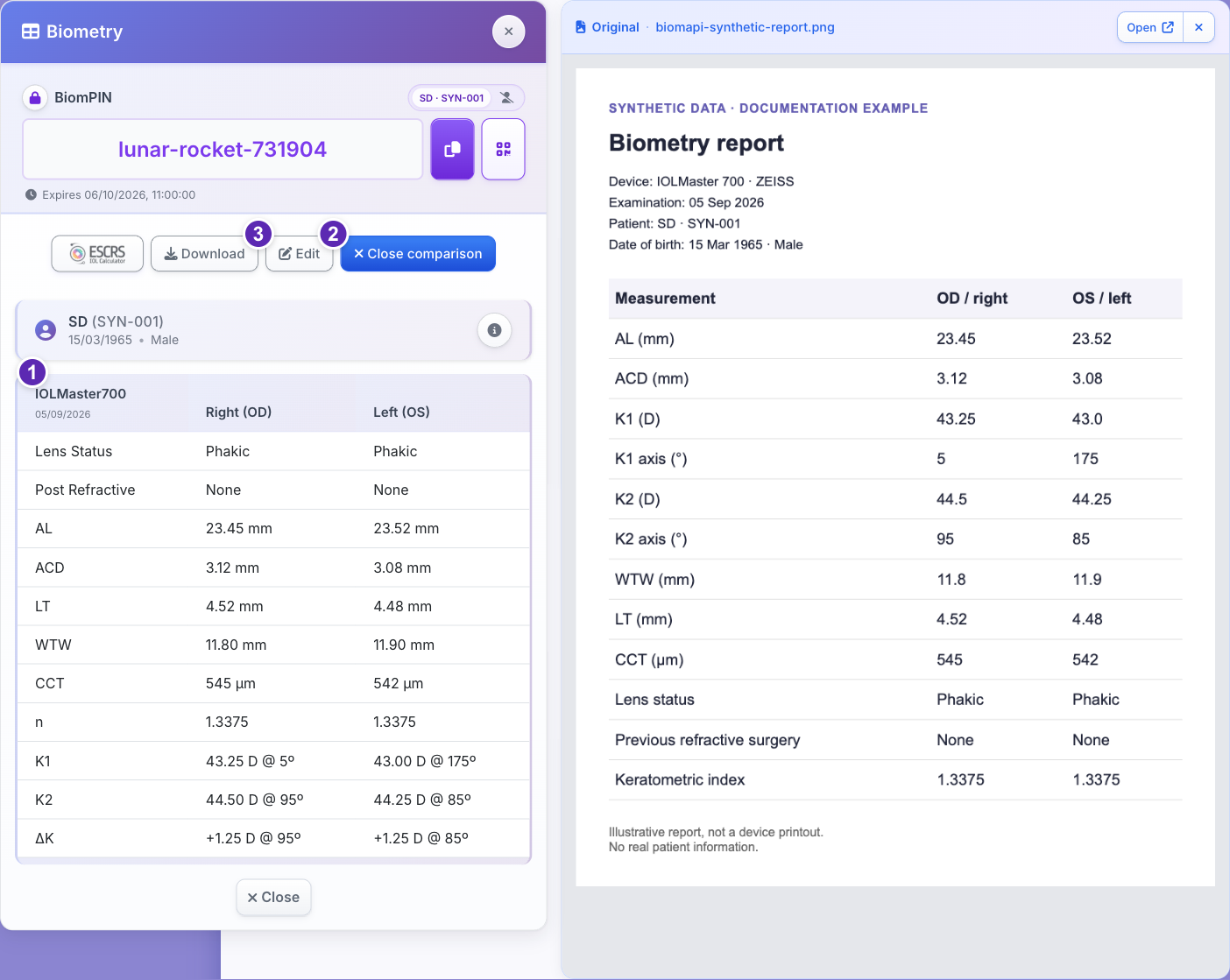 *Synthetic example. The numbered markers identify the measurements, Edit, and Download. [Open the full-size screenshot](/docs/images/review-example.png) to inspect it.* Select **Edit** to change a value. Saving creates a new result attributed to `BiomDIRECT`, including when the original extraction was BiomAI. Unsaved changes prompt for confirmation if you try to close the form. Before submission, the editor checks the [measurement ranges](/docs/api/response-schema/) and highlights fields needing correction. For K, PK, and TK, the first magnitude must be less than or equal to the second. If both axes are entered, they must be 90° apart. Partial measurements are allowed. PK powers accept either sign and are saved as positive magnitudes. The results table continues to display posterior powers using the negative convention. The **Metadata** information button beside the patient details shows the processing method, timestamp, and available model or source details. See [how provenance works](/docs/guides/how-it-works/#the-three-processing-paths). ### Understand the displayed values The table includes AL, ACD, K1/K2 and their axes, WTW, LT, CCT, lens status, refractive-surgery status, and keratometric index. Notes and posterior keratometry appear when provided. TK1/TK2 and ΔTK appear before the PK rows when available, under the shared device header. Total keratometry can be edited in the modal and is included in JSON, CSV, and XLSX downloads. [Supported devices](/docs/guides/supported-devices/) explains what BiomAI extracts. The [response schema](/docs/api/response-schema/) defines units and ranges. Three astigmatism summaries are calculated for display: `ΔK = (K2 − K1) @ K2 axis`, `ΔTK = (TK2 − TK1) @ TK2 axis`, and `ΔPK = (PK2 − PK1) @ PK2 axis`. Posterior powers are displayed as negative values. These display conventions do not change JSON, CSV, XLSX, or stored measurements. ## Share or retrieve a result When a BiomPIN is available, its card shows the code, expiry, and QR code. The identity/**Anonymous** selector controls whether copied links and QR codes include the available patient initials and ID. Identity is selected by default for each result. **Anonymous** removes those two identifiers from the link. It does not remove all potentially identifying information from the report. See [what a BiomPIN contains](/docs/api/biompin/#what-is-shared). To reopen a result, select **BiomPIN** and enter the full code, including all six digits. Opening a BiomAPI PIN link retrieves it automatically. Avoid guessing: repeated wrong numeric PINs can permanently destroy the share. ### Open the ESCRS calculator The **ESCRS** action opens the configured IOL calculator with a BiomPIN link so it can import the measurements. When available, patient initials and ID may travel separately in the URL fragment. Treat an identifying link as patient data and check the imported values in the calculator. ### Find a result in History History keeps BiomPIN entries in this browser, including the PIN, available initials/ID, and expiry. Select an entry to retrieve the measurements again. Identity already known to this browser can be restored locally. History is not synced between devices and does not store a permanent copy of the report. Clearing an entry removes the local shortcut. It does not delete the server’s share. Download results you need to keep before their BiomPINs expire. ## Process multiple files Choose **Select multiple files** from the chevron menu. Set the options before choosing the files: | Option | What to choose | | ---------------------- | ----------------------------------------------------------------------------------------------- | | **Add to history** | On by default; creates a BiomPIN for each successful result. Turn off to avoid creating shares. | | **Create spreadsheet** | On by default; includes combined CSV and XLSX files in the download | Every PDF/image extraction costs one credit. Use the OpenRouter-key link for BYOK. Server-default batches wait when the processing queue is full. JSON files can continue. Select **Single file** to cancel pending work. Keep the tab open until processing finishes. Files are processed as individual requests, and each row shows its outcome. Review failures and successful results before export. The browser has no fixed file-count cap, but quotas and export-size limits still apply. ## Download your results * **Single report:** choose **Download** to save the complete JSON response, including provenance and any BiomPIN information. * **Dataset:** choose **Download ZIP** for individual JSON results and, if selected, combined CSV and XLSX spreadsheets. Failed files have no result to export. The spreadsheets contain two rows per report, one for each eye, with `right_eye=1` for OD and `right_eye=0` for OS. JSON filenames use the patient ID and device where available. [Export details](/docs/api/endpoints/#post-apiv1biomexport) describes the archive and limits. ## Keys and usage The bottom status bar shows your access and remaining credits. You can enter a BiomAPI key for its assigned quotas or an OpenRouter key for BYOK extraction. Saved keys remain in this browser’s local storage until cleared. See [authentication](/docs/api/authentication/) and [credits and limits](/docs/api/rate-limits/) for the difference between the two keys and when requests consume credits. ## Report an extraction problem When feedback is enabled, fresh single-file BiomAI results offer an accuracy rating. The rating sends only your choice and a technical reference, not the report or measurements. You can still rate the original extraction after editing it in the same session. After a negative rating, **Let us know what went wrong.** opens an optional feedback form. Nothing is emailed until you press **Send**. You can include a de-identified copy of the original JSON. Check the displayed copy before you send it. The source report is never attached. See [feedback privacy](/docs/privacy/#contact). ## Use BiomFILL The [BiomFILL browser extension](https://chromewebstore.google.com/detail/biomfill/ejkhgpaplponemicgfmenibfemjhofcd) brings BiomAPI into supported browser form workflows. Use it when you want to fill a compatible form without building an integration yourself. Check its store listing for supported sites and setup. For your own application, use the [Web Widget](/docs/api/web-widget/), which returns data only after the user presses **Send**. For help with uploads, missing values, or expired shares, see [Troubleshooting](/docs/guides/troubleshooting/).
# Privacy policy
> How BiomAPI handles uploaded biometry reports, phone-to-computer transfers, BiomAI processing, BiomPIN sharing, browser storage, and user responsibilities.
Last updated: October 28, 2026 ## At a glance | Activity | Where the data goes | | ------------------------------- | ------------------------------------------------------------------------------------------------------------------------------------------------------------------------------------------------------- | | PDF or image processing | BiomAPI and the configured Gemini route: OpenRouter and an eligible downstream provider, or assigned Vertex with optional OpenRouter fallback; raw uploads are not retained by BiomAPI after processing | | JSON validation or manual entry | BiomAPI, without a Gemini call | | Phone-to-computer transfer | An encrypted browser-to-browser connection, with a disclosed relay fallback when needed | | BiomPIN sharing | Temporary encrypted storage, excluding patient initials and ID; other report fields remain | | Browser History and saved keys | Local storage on that browser/device | Removing initials and ID does not anonymize the full report. Read the details below before uploading or sharing patient data. BiomAPI is an interoperability and data transport service for optical biometry data. It extracts, validates, normalizes, exports, and temporarily shares structured biometry data so users can move data between systems more easily. BiomAPI is **not a medical device**. It does not diagnose, recommend treatment, calculate clinical decisions, or replace professional review. It does not intentionally alter clinical measurements; manual edits are user-directed, and automated processing is limited to extraction, validation, normalization, formatting, and transport. LLM-based processing is not error free. BiomAI may misread a report, omit data, assign values to the wrong eye, misunderstand device-specific formatting, or produce otherwise incorrect structured output. Other processing modes are designed to be deterministic, but may still produce incorrect or unexpected results because of invalid input, user entry errors, schema constraints, software defects, or integration issues. In all scenarios, and especially when automated extraction is used, the user is responsible for independently reviewing and confirming the data before relying on it. ## User responsibility You are responsible for ensuring that you have the individual, institutional, contractual, and legal rights needed to upload and process any report or data submitted to BiomAPI. This includes obtaining any required consent, authorization, institutional approval, or other lawful basis; complying with local health-data and privacy rules; and anonymizing or redacting printouts before upload when required. BiomAPI helps minimize stored identifiers, but it does not make an upload lawful by itself. ## What BiomAPI processes BiomAPI handles two input types: | Input | Processing path | | ------------ | --------------------------------------------------------- | | PDF or image | BiomAI extracts structured data using Gemini | | JSON | BiomJSON validates and normalizes the submitted structure | JSON inputs may be previously stored BiomAI results, user-edited results, manually entered data from the web app, device integrations, EHR exports, or other directly formed payloads. `BiomDIRECT` is not a separate processing engine; it is the provenance label used when the submitted or edited data was directly formed rather than extracted by BiomAI. BiomDIRECT data is still validated through BiomJSON. Responses can include biometer details, patient demographics, eye measurements, optional notes, optional posterior keratometry, metadata, and optional BiomPIN information. In ordinary processing responses and browser-local context, patient names are forcibly converted to all-caps initials/acronyms by the schema validator. For example, `John Douglas Doe` becomes `JDD`. **This acronym and the patient ID are not stored in the BiomPIN database**: before a BiomPIN payload is encrypted and stored, BiomAPI removes both patient name/initials and patient ID. BiomAPI does not store raw uploaded files after processing. During live processing, the service necessarily sees submitted content in plaintext so it can validate files, call Gemini when BiomAI is used, build the response, and optionally create an encrypted BiomPIN record. ## Phone upload When enabled, Phone Upload uses a one-time QR code to pair a phone browser with the desktop browser. The QR pairing credential is placed in a URL fragment, is not included in the phone page’s normal HTTP request, and is removed from the phone address immediately after the page reads it. BiomAPI’s WebSocket signaling service exchanges only temporary WebRTC connection metadata, including session timing, IP addresses, SDP descriptions, and ICE candidates. It does not receive the selected report or photo bytes, rejects binary WebSocket messages, keeps pairing state only in memory, and deletes the session when it succeeds, is cancelled, disconnects, or expires. The file itself is transferred through an encrypted WebRTC data channel. Browsers first attempt a direct peer-to-peer connection. Cloudflare’s STUN service may process peer IP addresses and connectivity metadata while establishing that path. If NAT or firewall restrictions prevent a direct connection, Cloudflare Realtime TURN may relay the encrypted WebRTC packets. Cloudflare can then process the peer IP addresses, connection timing, and encrypted relay traffic needed to provide that service, but WebRTC encryption prevents the TURN service from reading the file content. The interface identifies whether the selected path is direct, relayed, or unknown when the browser exposes enough connection statistics. When analytics is enabled for a deployment, BiomAPI records one privacy-minimized reliability event when a phone-upload session ends. It contains only the terminal outcome, session duration, the failure stage when applicable, whether relay fallback was available, an allowlisted technical failure reason when applicable, the direct, relay, or unknown transport classification, the UDP, TCP, TLS, or unknown relay protocol when a relay was used, the deployment environment, and the app version. Completed transfers also include the file size in bytes and client-measured connection-setup, transfer, and WebRTC send-buffer wait durations. It uses a generic phone-upload analytics identity and does not include participant IP addresses, pairing or session identifiers, QR URLs, filenames, MIME types, file dates, file hashes, SDP descriptions, ICE candidates, or file content. ## BiomAI, OpenRouter and Gemini PDF/image reports and extraction prompts are sent to OpenRouter Chat Completions, which routes to an eligible provider of the configured Gemini model. BYOK, assigned OpenRouter keys, and server-default requests use this path. OpenRouter requests require `provider.zdr=true`, `data_collection="deny"`, and support for required parameters. OpenRouter response caching is disabled. PDFs explicitly request native processing; BiomAPI does not request a third-party OCR fallback. For explicitly configured authenticated keys, the temporary Vertex-first route sends the prepared report and prompts directly to the assigned Google Cloud project. A transient failure can then send the same report and prompts through server-default OpenRouter. The direct attempt waits up to 8 seconds for first answer text; a started response retains the normal attempt deadline. Partial responses are discarded on fallback. Closing a local connection does not guarantee that the original provider stops processing or billing the request. Direct Vertex requests use the assigned project’s Google Cloud terms and settings; OpenRouter’s ZDR routing flags apply only to the OpenRouter leg. The project owner controls the direct route’s logging, retention, region, and applicable exceptions. BiomAPI does not create cached-content resources, enable tools, or request thought summaries on this route. Configuring `global` does not assert regional residency. For the configured Gemini model, OpenRouter’s [ZDR routing documentation](https://openrouter.ai/docs/guides/features/zdr) states that Google AI Studio endpoints are excluded and Google Vertex endpoints remain eligible. The downstream processing therefore uses Google Cloud managed Gemini, covered by the Gemini Enterprise Agent Platform policies. This routing depends on the configured model and OpenRouter’s current endpoint classifications; ZDR is a privacy constraint, not a permanent provider allowlist. Google’s [Service Specific Terms](https://cloud.google.com/terms/service-terms) and [Gemini Enterprise Agent Platform retention documentation](https://docs.cloud.google.com/gemini-enterprise-agent-platform/resources/zero-data-retention) state that customer data is not used to train or fine-tune its AI/ML models without prior permission or instruction. Google’s [Cloud Data Processing Addendum](https://cloud.google.com/terms/data-processing-addendum) describes its processing obligations. These terms govern Google’s downstream processing; OpenRouter remains an additional intermediary with its own terms. BiomAI does not enable Grounding with Google Search, Grounding with Google Maps, or Gemini Live session resumption. Google’s retention requirements also depend on applicable abuse-monitoring rules, logging settings and any required exceptions in the upstream deployment. For OpenRouter requests, BiomAPI relies on OpenRouter’s ZDR endpoint classification rather than configuring or auditing that downstream project. For direct Vertex requests, the assigned project owner manages these settings. Google describes its default Gemini in-memory cache as project-isolated, used only for performance, stored outside at-rest storage, and subject to a 24-hour TTL. OpenRouter permits such implicit caching under ZDR. Disabling OpenRouter response caching does not disable this separate upstream cache. OpenRouter’s [ZDR routing](https://openrouter.ai/docs/guides/features/zdr) restricts eligible inference endpoints. It is not a blanket guarantee for plugins, tools, application logs, metadata or account-level observability. Account input/output logging and broadcasts should be disabled before clinical processing. Key owners control those account settings, billing, region and applicable downstream terms. If no eligible endpoint is available, processing fails without weakening constraints. **BYOK uses the same privacy controls enforced by BiomAPI’s code as server-managed extraction.** Providing your own OpenRouter key changes the credentials and billing, not these controls. Every OpenRouter extraction request, including retries, requires ZDR routing (`provider.zdr=true`), denies provider data collection (`data_collection="deny"`), requires support for the requested parameters, and disables OpenRouter response caching. These controls cannot be disabled through BiomAPI’s BYOK interface. If no eligible endpoint is available, extraction fails without relaxing the rules or switching to another key. ZDR routing requires inference endpoints that OpenRouter classifies as not retaining prompts or completions or using them for training. The qualifications above concerning account-level logging, metadata, plugins and upstream in-memory caching also apply to BYOK; the routing controls do not disable those separate features or settings. Retrying an ambiguous timeout can produce additional provider charges. Raw provider errors and reasoning text are not included in analytics or forwarded to clients. ## BiomPIN and browser storage BiomPIN is optional through the API. The web app requests it for single reports, its dataset workflow enables it through Add to history by default, and the CLI enables it unless `--no-pin` is used. When requested, BiomAPI creates a temporary encrypted copy of the standardized response for later retrieval with a code such as `lunar-rocket-731904`. BiomPIN uses a two-part design: `lunar-rocket` is the stored share ID, and `731904` is the numeric PIN, which is never stored. The encryption key is derived from the numeric PIN using Argon2id, and the payload is encrypted with AES-256-GCM. Retrieval derives the decryption key from the supplied numeric PIN. The service does not persist that PIN in BiomPIN storage. **Before a BiomPIN payload is encrypted and stored, BiomAPI removes patient name/initials and patient ID.** A BiomPIN retrieved from another browser or device therefore returns the biometry data without those two identifiers. The web app may restore patient context locally for convenience. Browser `localStorage` may contain BiomPIN history, patient initials/acronym, patient ID, BiomPIN expiry time, saved BiomAPI API key, saved OpenRouter BYOK key, and UI state. This data remains on that device/browser until cleared by the user, the browser, or app cleanup logic. Integrations may pass patient context in a URL fragment such as `#biomctx=...`. URL fragments are not sent to the server in normal HTTP requests, but this fragment is reversible rather than encrypted. Anyone who receives the complete URL can decode the patient acronym and ID contained in it, and page scripts can access the fragment. Treat a complete URL containing `#biomctx` as patient-identifying data. Patient identifiers should not be placed in query parameters. For web-app BiomPIN links and QR codes, choosing **Anonymous** beside the BiomPIN heading removes this fragment. Patient identity is selected by default for each result. The standalone CLI can store `BIOMAPI_KEY`, `OPENROUTER_API_KEY`, `BIOMAPI_URL`, and `ESCRS_IOL_CALCULATOR_URL` in `~/.config/biomapi/config`. The file is plain text. On POSIX systems, the CLI restricts the configuration directory to mode `0700` and the file to mode `0600`; on Windows, access follows the user profile’s ACLs. Environment variables avoid persistent CLI configuration but may still be exposed to local processes or shell configuration, depending on the operating system. BiomPIN records expire automatically after the configured expiry period, 744 hours or 31 days by default. Expired records are pruned when new BiomPIN records are stored. A BiomPIN record is also permanently deleted after the configured number of failed PIN attempts, 3 by default. ## Logs and analytics Processing analytics record whether a request included the deprecated `service_tier` parameter, without recording its value, to track client migration. ### Persistent quota accounting BiomAPI stores timestamped credit charges in its SQLite database so quotas survive server restarts. Each record contains a keyed hash of the quota bucket identity, and accounting timestamps; every event counts one operation. Raw client IP addresses, API user IDs, API keys, and report content are not stored in quota records. The stable hashing key is stored separately in the same database; these identifiers are pseudonymous, not anonymous. Charges stop counting outside the rolling 24-hour daily quota window even if their records have not yet been deleted. Successful reservations opportunistically remove up to 1,000 expired records, at most once every five minutes per application process. Without further activity, expired records may remain until requests resume. Database backups and disk snapshots follow their own retention periods; deleting live records does not immediately remove those copies. Queue admission is process-local and kept only in memory. It uses hashed caller and provider-key identities to coordinate waiting work, and is not persisted in the quota ledger. ### Operational logs and events BiomAPI processes operational information needed to run the service, protect the API, troubleshoot issues, and enforce quotas. Depending on the operation and outcome, server logs may include the IP address, request ID, authenticated user ID when an API key is used, engine type, file extension, error category, device model/name, BiomAI processing time, and BiomAI token usage metadata. Operational logs do not store raw uploaded files, response payloads, clinical measurements, patient demographics, patient names, patient IDs, notes, or model output. BiomAPI analytics, when enabled for a deployment, use a small set of operational and user-action events: * One `biom_process` event per processing attempt, with its outcome, engine, file extension, request ID, matching `process_request_id`, BiomPIN outcome, duration, and error category and stage when applicable. Successful BiomAI events can also include credential source, model, device name, token counts, retry count, LLM response time, and limited preprocessing diagnostics such as status, byte counts, PDF type, and page count. * One `biom_retrieve` event per retrieval attempt, with its outcome, request ID, duration, device name on success, and error category when applicable. Successful retrievals also include the `process_request_id` stored in the decrypted BiomPIN payload so they can be correlated with the processing event that created the BiomPIN. Failed retrievals omit it when the payload cannot be decrypted. * One `biom_export` event after a successful export, with the selected format set, response count, request ID, and duration. * The terminal `phone_upload_session` event described in **Phone Upload** above. * One `biomai_feedback` event when a user rates a BiomAI extraction as accurate or inaccurate through the web app or feedback API. It contains the rating as `outcome`, feedback HTTP `request_id`, and original `process_request_id`, with the deployment environment and app version. It uses a generic feedback identity, not an API user ID, and does not include report content or contact-form text. The `process_request_id` allows correlation with the existing processing event. Processing and retrieval events include only the affected quota bucket’s cost, limit, usage after the attempt, whether credits were consumed, and, for rejected attempts, the limiting scope and retry delay. This makes quota use observable without sending periodic snapshots of every quota. Queue admission rejections also include the shared queue limit, waiting count, and whether the caller already had waiting work or the queue was full; caller identities and report content are not included in these properties. Calls to the usage endpoint do not emit analytics events. Processing, retrieval, export, and feedback events may include `integrator_id`, `integrator_origin_host`, or both. The first is a short, caller-declared client or integration identifier. Official clients conventionally use the reserved `biomapi.*` namespace: `biomapi.biomweb`, `biomapi.cli`, `biomapi.browser-sdk-demo`, and `biomapi.biomfill`. The namespace is not authenticated. A missing or invalid ID remains absent rather than being stored as `unknown`. `integrator_origin_host` is the validated host from a declared logical integration origin when accompanied by a valid ID, otherwise from the standard browser HTTP `Origin`. It can therefore be retained without an integrator ID. It may be a domain, localhost name, browser-extension ID, or numeric IP literal when the page itself was served from a numeric address. BiomAPI does not retain the origin scheme, port, path, or the connecting client’s source IP in analytics. These properties are soft operational attribution and can be spoofed by non-browser clients. They do not change request authorization, processing, quotas, billing, or other security decisions. Connection IP remains separate: public quota accounting stores a keyed hash as described above, while other abuse controls can use the address transiently. Operational logs may include the address as described in this section. Authenticated API events use the configured API user ID as `api_user_id` and as a namespaced analytics identity, so activity remains attributable to the API account without sending the API key. Public API, export, feedback, and phone-upload events use deployment-level, non-person identities. They do not send the client IP as an analytics property, disable GeoIP enrichment, and do not create PostHog person profiles. All events include the deployment environment and app version. Analytics events do not include raw uploaded files, response payloads, clinical measurements, patient demographics, patient names, patient IDs, notes, model output, filenames, raw OpenRouter keys, assigned credential secret values, or API keys. Phone-upload reliability analytics follow the narrower limits described in **Phone Upload** above and are not tied to an HTTP request or IP-based analytics identity. ## Security and deletion BiomAPI uses HTTPS encryption in transit. Stored BiomPIN records are encrypted, and the numeric PIN used to derive the key is not persisted in BiomPIN storage. The service necessarily handles plaintext during processing and retrieval. Wrong-PIN limits and record deletion protect online retrieval. They cannot protect a database copy already taken from storage; offline guessing remains possible, with Argon2 increasing the cost of each guess. See [BiomPIN encryption and its limits](/docs/api/biompin/#encryption-and-its-limits). BiomPIN records are temporary and expire automatically. They can also be destroyed by failed PIN attempts. Browser-local history and saved keys can be cleared from the web app or by clearing the browser’s site data. ## Contact For privacy, security, or compliance questions, contact the BiomAPI developer using the contact form on the website. After a negative extraction rating, **Let us know what went wrong.** optionally opens a separate feedback form with a read-only **Request ID** plus required **Name**, **Email**, **Biometer**, and **Message** fields. Opening it does not send a message. When you select **Send**, Web3Forms sends an email whose subject and body contain the processing request ID and whose body also contains the values you entered. You may be contacted by email for follow-up. You can also explicitly choose to include a de-identified JSON snapshot of the original extraction. The exact JSON is shown in a read-only field before submission. Patient name, patient ID, date of birth, gender, exam date, free-text notes, BiomPIN information, and patient identity context (`biomctx`) are removed from that snapshot. The snapshot remains the original extraction even after editing. The original report is never included. Do not enter patient-identifying information in the message. The general contact form remains separate. Selecting **Send Message** there sends the name, email address, and message you provide through Web3Forms to the BiomAPI developer. Contact and feedback emails are separate from analytics. Ratings are voluntary user reports, not a measured extraction accuracy rate; an unrated result is not treated as correct.